<style>
h3{border-bottom: 2px solid black;}
section {
padding: 0em 1em;
padding-bottom: 1em;
padding-top: 1em;
border-radius: 4px;
background-color: #f7f7f7;
border: 1px solid #ccc;
}
summary {
font-weight: bold;
}
summary:hover {
text-decoration: underline;
}
.todo {
color: #ff00ff;
border: 2px dashed #ff00ff;
padding: 0em 1em;
border-radius: 5px;
//display: none; // UNCOMMENT TO HIDE TODOs
}
</style>
# **Homework 2: Understanding and Implementing Linked Lists**
**Due: Wednesday, October 2 at 11:59 pm**
:::info
**Collaboration Policy**: This assignment uses the default course [collaboration policy](https://docs.cs200.io/collaboration-policy). Roughly, you may discuss conceptual issues and how to debug/fix errors with Java, but you must write your code on your own. See the policy for details and examples of what is and isn't allowed.
:::
:::success
**For questions**: We'll maintain an **HW2 FAQ post** on Ed with a list of common questions and important clarifications. **If you're confused or stuck, please check this list first.**
Ed is a great discussion resource--please take advantage of the questions and answers we have already posted!
:::
# **Overview**
When starting a homework, we recommend that you read the entire handout before starting any code. We know they can be long, but that is purposeful to provide detail and guidance. Try to understand the big picture of the assignment and concepts before writing code. Start early and test as you go!
In lecture, we have looked at how to implement both immutable and mutable Linked Lists. This assignment has you look at how these two kinds of lists work when extended with a remove operation. You'll look at this from the perspectives of memory diagrams, implementations, and runtime analysis.
## Learning Objectives
- Understand how to implement (mutable) lists
- Understand how lists work in memory
- Analyze runtime of programs
- Practice testing interacting methods
- Add private fields to help speed up the performance of methods
<section>
## Important resources
As you work on this project, remember that we’ve prepared some resources that will be helpful:
<ul>
<li> Our <a href="https://docs.cs200.io/java-debugging-guide#"> guide to finding errors in your code </a></li>
<li> For IntelliJ issues check out our <a href="https://docs.cs200.io/s/intellij-guide">IntelliJ Setup Guide</a>, specifically the <a href="https://docs.cs200.io/s/intellij-guide#Common-BugsFAQ">Common Problems</a> section
</li>
<li> For help with handing in your work and understanding autograder results, see the <a href="https://docs.cs200.io/gradescope-submission-guide">Gradescope submission guide</a>
</li>
</ul>
</section>
## The stencil code
Here is the [GitHub Classroom link](https://classroom.github.com/a/teZY0t07) to get started. **Be sure to follow the [Java Stencil setup guide](https://docs.cs200.io/s/java-stencil-setup-guide)** for instructions on how to do this.
This assignment requires that you have IntelliJ installed and set up for this course. For details on the setup process, please see the [IntelliJ Setup Guide](https://docs.cs200.io/s/intellij-guide). If you’re having trouble, the guide includes a [Common Bugs/FAQ](https://docs.cs200.io/s/intellij-guide#Common-BugsFAQ) section which might help.
<!--
<details>
<summary>
<b>Stencil Code Overview</b>
</summary>-->
### What's in the stencil?
The stencil code for this project has two main directories, `sol` and `src`:
- The `src` directory contains:
- An `IList<T>` interface
- An `IListWithNode<T>` interface (more on that later)
- The `AutograderCompatibility` file (see [Handing In](#Handing-In))
- The `sol` directory contains:
- Versions of the `MutableList<T>` and `Node<S>` classes that we began developing in lecture, as well as the test file `Homework2TestSuite`. You'll expand these with new methods as part of this assignment.
After you download the code, we recommend that you start by looking over the code to get a high-level overview of what’s in the stencil, and what you’ll need to implement. Specifically:
1. Look over what methods are already implemented and read their javadocs to understand what they do
3. Especially take note of the javadocs in the interfaces, which explain the expected behavior of methods you will be implementing, and how to handle various edge cases
4. Try to figure out how each file interacts with the others (for example, what is the relationship between **Node.java** and **MutableList.java**?)
<!--</details>-->
***
# **The assignment: what you need to do**
Here is a summary of the tasks for this assignment. The overall handout includes frequently asked questions and breaks problems down into a step-by-step process with numbered tasks. If you need to ask questions on Ed, please use the task numbers to refer to a specific part of the assignment.
<section>
### Part 1: Building a Mutable List (ML)
**Write code and tests for three methods in `MutableList<T>` (abbreviated ML here), which are named in the** `IList<T>` **interface):**
1. `ML.get(pos)`, which returns the element at position/index `pos` in the list `ML` (index numbers start from 0)
<details><summary>Details</summary>
- use recursion, not a `while` loop
- throw `RuntimeException(“Index out of bounds”)` if the number given as `pos` is too small or too large
- annotate the `get` method with a runtime analysis in a comment in the `MutableList<T>` class.
</details>
2. `ML.addLast(newElt)`, which mutates `ML` to have `newElt` as a new last element.
3. `ML.size()` which returns the number of elements in `ML` in O(1) (constant time)
**[[More info]](#Part-1-MutableListltTgt)**
<!-- <details>
<summary>
<a href="#Part-1-MutableList<T>">Part 1: Building a Mutable list (ML)</a>
</summary>
</details> -->
### Part 2: Mutability and Removing information in Context
<!-- <details>
<summary>
<a href="#Part-2-Mutability-and-removing-info-in-context">Part 2</a>
</summary> -->
Think a bit more deeply about mutability by writing a response to a prompt about deciding what should be editable about browsing history or social media data.
**[[More info]](#Part-2-Mutability-and-removing-info-in-context)**
<!-- <details>
<summary>
<a href="#Part-3-Remove-in-Singly-LinkedLists">Part 3</a>
</summary> -->
### Part 3: Understanding remove in Singly Linked Lists
- Draw an environment/heap diagram to illustrate the results of a specific program (given in the detailed section below) that uses a remove method on `MutableList<T>`s. Your filename should be _memory.pdf_ or _memory.png_.
- Write a good set of tests for `remove`
- Analyze a code outline for implementing `remove` and describe what would need to be done to finish the code (without writing that code)
**[[More info]](#Part-3-Remove-in-Singly-LinkedLists)**
<!-- </details> -->
<!-- <details>
<summary>
<a href="#Part-4-Doubly-linked-lists">Part 4</a>
</summary> -->
### Part 4: Implementing `remove` in doubly-linked lists
- Add a `prev` field to the `Node<S>` class so that the list can be traversed forwards or backwards
- Use this field to implement a `remove` method on lists, aided by a `bypass` method to route around a `Node<S>` in a `MutableList<T>`
- Include a comment under the `remove` method in `MutableList<T>` with the method’s worst-case running time
- Expand your tests (if necessary) for `remove` to include ones that test how `remove` and `size` interact
**[[More info]](#Part-4-Doubly-linked-lists)**
<!-- <details>
<summary>
<a href="#Part-5-Handing-Out-Nodes">Part 5</a>
</summary>
-->
### Part 5: Explore the impact of "handing out" inner list Nodes
- Require the `MutableList<T>` class to implement the `IListWithNode<T>` interface
- `getNode` returns the first `Node<S>` that contains a given value as its datum
- `removeNode` removes a given `Node<S>` from a MutableList<T>. The runtime of your implementation must be O(1) \[constant time]
- `removeWithNode` removes the `Node<S>` in the list that corresponds to a given item.
<!-- </details>
-->
**[[More info]](#Part-5-Handing-Out-Nodes)**
</section>
## Notes on Testing
(**Skim this now, remember for later**) This assignment has several tasks to help you think about testing. We will grade your tests using “wheat/chaff” testing. There are two parts to this:
### Basic tests
**Some tasks ask you to write tests *before* you start writing code.** This is designed to help you build an intuition for what the code should be doing before you start writing code–the tests won’t pass until the code is written, but the idea is to predict and understand what the correct input/output of the coding task should be. These tasks will ask you to upload your <code>`Homework2TestSuite.java</code>to the <b>“Basic tests”</b> submission on gradescope. In this phase, we’ll check to see if the examples you are testing cover the most important functionality for a method. For more information, see <a href="#How-to-use-the-%E2%80%9Cbasic-tests%E2%80%9D">Basic tests</a>.
### "Chaff" testing
Creating basic tests while writing code is a great strategy, but it’s also important to write a **more comprehensive test suite that checks for more subtle edge cases** (eg. *“What happens if I call remove when a list is empty?”*).
At the end of the assignment [Task 8], we’ll ask you to expand your test suite (in <code>Homework2TestSuite.java</code>) to cover some important edge cases and upload the result to the “Full test suite” submission on gradescope. In this part, we will check your tests against a set of broken list implementations (called “chaffs”) to see if your tests catch them.
**For more details on how wheat/chaff testing works, and how to understand what the autograder output looks like, see the** [**More About Testing**](#More-about-Testing) **section.** In particular, there are notes about what you should expect to see if you check your tests against the chaffs before you’ve finished writing your code (which we encourage you to do).
:::danger
:warning: **Important**: **As you write tests**, do NOT call `Node<S>` methods in your testing file!
<br />
<details>
<summary>Why?</summary>
This is because we are giving you more freedom designing and naming your `Node<S>` methods, and if you try to call on a `Node<S>` method that we do not have in our wheat/chaff implementation (or make different assumptions in your implementation than we do), your tests will not run on the Autograder. The only exception is that you can use <code>hasItem</code> when testing getNode in Task 8. To test that your Nodes are working correctly, you can test them indirectly using `MutableList<T>` methods, or make a separate file that you do not hand in. Also, do not call any `MutableList<T>` methods that are not in the two interfaces we gave you.
</details>
:::
***
# **Part 1: `MutableList<T>`**
## Details: Get method
In this part, we will implement the `get` method from the `IList<T>` interface. This method takes a position in the list and returns the item at that position (the first element is in position 0).
To get you to think about how this will work, we will write some tests first and then build the implementation.
### Task 1-A
In <code>Homework2TestSuite.java</code>, write a test method called `testGet` that:
- Initializes an example list using `addFirst` (If you want to reuse the list for future tests, you can create it in a setup method annotated with `@Before`).
- Calls `get` on the example list and uses `Assert` statements to check the behavior vs. the expected values
For this task, do not worry about writing tests if the given index is too large or negative (yet).
:::success
<details>
<summary>
<a>Hint</a>
</summary>
Refer to the getFirst tests we gave you at the bottom of this document ([here](#What-should-my-tests-look-like)) for an example of how this was done for another method.
</details>
:::
:::info
**Note**: If you run the main autograder testing suite, this test will NOT pass because the `get` method has not been implemented yet
:::
When you have written your tests for this part, **submit** your `Homework2TestSuite.java` to the "**Homework 2: Testing (Basic tests only)**" assignment on Gradescope to check your work. At this stage, you should see **one passing test for `get`**, which should look like this (other test failures are okay for now--they're for later!):
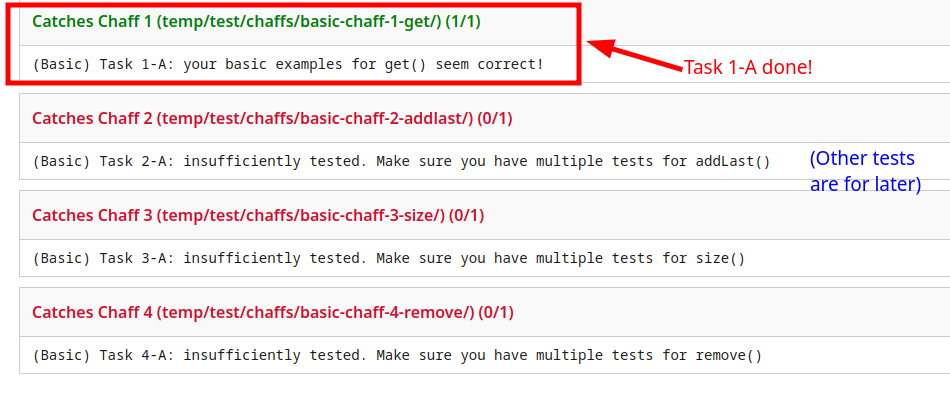
**If the test failed**: this means that your test doesn't yet match the correct behavior for how `get` should work; take a look at your assertions and make sure they match the values you expect.
**Once your tests pasess, take a moment to reflect on what this means**: you just wrote some tests for `get` and our testing autograder confirmed that these tests were correct. Now, you can use your own tests to help you write `get` and make sure it works correctly! (Which you'll do in the next task!) This is an example of what we call *test driven development*, a strategy for developing software designed to help you think about how to approach problems. You'll continue developing like this for more parts of the assignment, and we encourage you to consider this approach as you work on the rest as well!
For more info on how to interpret the autograder output, see [here](#More-about-Testing).
### Task 1-B
Now that you know your tests for `get` are correct, **implement the `get` method inside of `MutableList<T>`**. To help with this, you should write a recursive helper method in the `Node<S>` class, as we did for `size` in lecture.
Your `get` method in the `MutableList<T>` class should not itself be recursive and should not iterate over the list with a loop–this is because `MutableList<T>` only has a reference to the starting `Node<S>` of the list (`this.start`). However, this starting `Node<S>` has reference to the next `Node<S>` (and so on), so a recursive helper method in the `Node<S>` class can access all elements in the list. How can you use this recursive structure of `Node<S>`s to access the i’th element (ie, the element at index i)?
:::info
<details>
<summary>
<a>Note</a>
</summary>
In addition, you should not try to solve this by writing a `getNext` method inside `Node<S>` to expose other elements to `MutableList<T>`.
</details>
:::
:::success
<details>
<summary>
<a>Hint</a>
</summary>
If you are having trouble implementing the recursive method in the `Node<S>` class,think about this: in your recursive helper function, how can you keep track of how far the the current node is from the target index?
</details>
:::
If the given index is too large or negative, the `get` method inside the `MutableList<T>` class should `throw new RuntimeException("Index out of bounds")`.
### Task 1-C
**Run your tests and debug the `get` method, if needed.** If your tests don’t work, first make sure you understand the expected behavior correctly and have correct tests. If your tests are correct and still don’t pass, then work on debugging your method. Remember the debugging techniques available to you: you can draw before/after diagrams, print out the lists, or use failing tests to set a breakpoint and step through the debugger.
:::warning
:warning::warning::warning:**Warning: It’s important to make sure your** `get` **passes your tests (which you just checked in the testing autograder in Task 1-A) before moving on to other steps**. In later parts, you'll use your `get` method to make sure other methods are working, so it's important to check this before you go any further!
:::
### Task 1-D
Add tests for if the given index is too large or negative. We call test cases like these “edge cases.” Remember a `RuntimeException("Index out of bounds")` will be thrown if the given index is too large or negative.
If you need a reminder on testing for exceptions, you can follow this format:
<section>
<details>
<summary>Example</summary>
```java
@Test(expected = RuntimeException.class)
public void getFirstRuntimeException() {
MutableList<Integer> myMutableList = new MutableList<Integer>();
myMutableList.getFirst(); //trying to call getFirst when the list is empty
}
```
</details>
</section>
### Task 1-E
In a comment immediately under the `get` method, write down the worst-case running time of `get` on a list of _N_ elements. You should give this in big-O notation.
:::success
**Success**: This is the end of part 1, yay! Now that you’ve written and tested the `get` method, you can use it to help you test list equality more easily.
We've prepared a helper method `compareTwoLists` that uses your `get` to help with testing: to use it, **uncomment the `compareTwoLists` method in `Homework2TestSuite.java`**. This method takes in two `IList<T>`s and returns true if they have the same contents and false otherwise--you can use this to write your tests!
:::
## Details: addLast
### Task 2-A
Write a test method called `testAddLast` that:
- Initializes an example list
- Calls `addLast` to add element(s) to the end of the list
- Uses `Assert` statements and the `compareTwoLists` method in `Homework2TestSuite.java` class to check that each call to `addLast` performed the relevant modification to the list (because `compareTwoLists` returns a boolean, this means that you will wrap this method call in a call to `assertTrue` or `assertFalse`, as needed)
:::info
**Note**: If you run the testing suite now, this test will not pass because the `addLast `method has not been implemented yet--**this is okay, we're just writing the test so far**.
:::
Double-check your work by submitting your test file to Gradescope and looking for the _(Basic) Task 2-A_ item in the testing assignment autograder output.
### Task 2-B
Write the method `addLast` which takes in an item and adds it to the end of the list. It should have return type `void`. There are (at least) two ways to do this task:
<section>
<details>
<summary>Click for details</summary>
1. Add a field to the `MutableList<T>` class, perhaps called `end`, that points to the end of the list (similar to how the existing field `start` points to the beginning of the list), initialize it correctly in the `MutableList<T>` constructor, and perform some computation to this node and field in the `addLast` method. You can (and may need to) modify your addFirst method and other parts of pre-existing code in order to accommodate this change. Additionally, consider the fields of the node class and what they’d look like for the final node.
2. Do not add a field to the `MutableList<T>` class, and create a recursive method in the `Node<S>` class to traverse to the end of the list and add the new node.
</details>
</section>
<br>
With either approach, you will have to write a method in the `Node<S>` class to help you. **You **MUST** choose the one that has the lower big-O runtime**.
### Task 2-C
Write a 1-2 sentence comment justifying your implementation decision (whether you added a field or used a recursive method) based on runtime and put it at the top of the `addLast` method.
### Task 2-D
Run your tests and debug the `addLast` method, if needed.
***
## Details: Optimizing size
Having a class like `MutableList<T>` holding the sequence of nodes provides an opportunity to store values that might reduce the runtime of some methods. `size` is a good example. We can add a field (perhaps named `length`) that maintains the size of the list as elements are added. Then, when someone asks for the size of the list, we can return the value in that field rather than recur or loop through all of the nodes.
### Task 3-A
Write a test method called` testSize` that:
- Initializes and populates example list(s) using combinations of `addFirst` and `addLast`
- Uses `Assert` statements and calls to size to test that the size method returns the correct answer
Double-check your work by looking for the _(Basic) Task 3-A_ item in the testing assignment autograder output. If you’ve implemented `addLast` correctly, this test should also pass for the `size` implementation we’ve given you.
### Task 3-B
Add a field `private int length` to `MutableList<T>`. Modify the constructor, `addFirst`, and `addLast` to initialize and maintain this field. Modify the `size` method in `MutableList<T>` to make use of this new field.
### Task 3-C
In a comment immediately under the `size` method, write down the worst-case running time of your revised `size` on a list of N elements. (You are being asked to write down just the runtime of a single call of the `size` method, not of any calls to `addFirst` or `addLast` that came before it).
### Task 3-D
Run your tests and debug the `size` method, if needed.
***
# **Part 2: Mutability and removing info in context**
Decisions about what data can be changed and by whom underlie many design decisions in software products. These decisions center around priorities and tradeoffs.
:::info
**Submission note**: You'll be doing a bit of writing for this task. There’s no particular format for your submission--as you work on this part, write down your answers however you feel most comfortable (Google doc, text file, etc.) and include it in your final submission as `discussion.txt` or `discussion.pdf`. For more detailed subimssion instructions, see [here](#Handing-In).
:::
## Background
We've been talking a lot about mutable and immutable data structures. How do their priorities differ?
<section>
<details><summary>Expand for more</summary>
**Immutable Data Structures prioritize…**
- persistency and consistency of data
- record keeping
- failsafes + protection against data loss
- **Example**: A person’s edit history on a document editor could be represented as an immutable data structure.
**Why might we do that?** It’s useful to store the history of what the user wrote for actions such as ‘Undo’ and we don’t expect that history to change.
**Mutable Data Structures prioritize…**
- present data over past data
- real-time changes
- updating data across multiple interfaces
- **Example**: A list of comments on a forum post could be stored as a mutable data structure.
**Why might we do that?** It’s useful to be able to quickly update the comment section, supports edits and deletion easily, etc.
</details>
</section>
<br>
Storing data, especially about people, has a lot of broad implications. At the core of what you’re learning about data structures, mutability, immutability, removal, and deletion are questions about:
1. How long do we store data for?
2. Who has access to it?
3. Who owns that data?
4. Who decides all of these things?
<section>
<details>
<summary>What does this mean? </summary>
These questions may seem abstract, so let’s get concrete. Consider your browser history. It contains information like _home addresses, current location, friend groups, illegal activity, purchasing habits, political leanings, medical conditions, relationship status,_ etc. As you can see, handling browsing data is a big deal! Who or what should be allowed to modify this information?
To simplify, here are a few priorities to consider for browsing data:
1. **Deletion**, the ability to completely and permanently erase a piece of data universally
2. **Restriction**, the ability to restrict or remove access to data for certain groups
3. **Preservation**, the ability to ensure that the data remains intact and available should it be needed
</details>
</section>
### Task 4:
Write 8-10 sentences on which of these priorities seems most important to you and why in the context of browser history or social media data.
:::info
**Specifically, consider the following questions:**
1. How do these priorities interact and conflict with one another?
2. Who gets a say in what we prioritize (users, the government, the FBI, businesses, researchers, advertisers, etc.)?
3. Can you think of any other priorities or concerns that haven’t been addressed?
:::
<section>
<details>
<summary>
<b>Here is a possible template for your response:</b>
</summary>
<ul>
<li>Introduce your topic and argument</li>
<li>Back it up. Give us specific examples. You can use outside sources as you wish (for example <a href="https://techcrunch.com/2019/02/15/twitter-direct-messages">here</a> and <a href="https://www.thenationalnews.com/arts-culture/comment/2021/10/25/why-is-it-so-hard-to-delete-digital-accounts">here</a>). You can also bring in personal experiences.</li>
<li>Tie it all together - this is the “so what?” of your argument. Restate your main point and broaden your scope a little (this is often a call for action or mention of areas for future improvement/research).</li>
</ul>
</details>
</section>
## How to submit this part
Please save your notes in a file called `discussion.txt` (plain text) or `discussion.pdf` (export from Google doc, Word, etc.). You will submit this file along with your code--for details, see [Handing In](#Handing-In).
# **Part 3: Remove in Singly LinkedLists**
## Details: Understanding remove in Singly Linked Lists
So far, we’ve added elements to lists, but we haven’t removed them. What does removal mean in each of mutable and immutable lists? Here are examples of each in immutable (functional) and mutable (Java) lists:
<section>
<details><summary>Immutable version</summary>
```java
LinkList Lim = new emptyList().addFirst(7).addFirst(9).addFirst(3);
LinkList Lim2 = Lim.addFirst(8);
System.out.println(Lim);
// prints a list with 3, 9, 7
System.out.println(Lim2);
// prints a list with 8, 3, 9, 7
System.out.println(Lim.remove(3));
// prints a list with 9 and 7
System.out.println(Lim);
// prints a list with 3, 9, 7
System.out.println(Lim2);
// prints a list with 8, 3, 9, 7
```
</details>
<details><summary>Mutable version</summary>
```java
MutableList<Integer> Lmut = new MutableList<>();
Lmut.addFirst(7);
Lmut.addFirst(9);
Lmut.addFirst(3);
System.out.println(Lmut)
// prints a list with 3, 9, 7
Lmut.remove(3)
System.out.println(Lmut)
// prints list with 9 and 7
```
</details>
</section>
<br>
In short, with an immutable list, `remove` returns a new list without the given item, keeping the item in the original list. In a mutable list, the given item is taken out of the list.
:::info
<details>
<summary>
What about duplicates?
</summary>
There are questions about how this should work if an item is in the list multiple times: does "remove" mean "remove once" or "remove all"?
For this assignment, we'll follow a "remove once" interpretation, in which only the first occurrence of an item gets removed. We’ll also follow the convention that the remove item returns a boolean (and returns true if it successfully removed the item in question from the list, and false if it did not find the item and therefore left the list unchanged.)
</details>
:::
## Remove examples
### Task 5-A:
Write a test method called `testRemove` that:
- Initializes and populates example list(s) using `addFirst` and/or `addLast` (or uses lists from your setup method)
- Calls `remove` one or more times on the list(s). **For now, do not test removing from the very beginning or very end of a list. You’ll see why in a few tasks.**
- Uses `Assert` to check that each call to remove an item performed the relevant modification to the list (see the yellow box below for an alternative for how to do this)
- Checks the return value for each call to the `remove` method (see blue note box above to understand what remove should return)
<br>
:::warning
<details>
<summary> <b>Warning</b></summary>
One challenge here lies in figuring out what to compare the results of `remove` to. There are two general ways to approach this: one is to build both the original list and a second list with the intended item removed, then to assert that they are equal. Another approach is to leverage `toString`! You can compare the `toString` result of the `MutableList<T>` after removing an item to a string that shows the expected order of elements.
</details>
:::
Write at least one test for each of the two approaches in the yellow box above. If you are confused about how to achieve this, refer to the simple example below!
:::info
<details>
<summary>
Example
</summary>
```java
/*
* Approach 1: using compareTwoLists
*/
@Test
public void testWithCompareLists() {
MutableList<Integer> intList1 = new MutableList<Integer>();
intList.addLast(2);
intList.addLast(3);
intList.addLast(4);
MutableList<Integer> intList2 = new MutableList<Integer>();
intList2.addFirst(4);
intList2.addFirst(3);
intList2.addFirst(2);
// call the helper function we have provided with you!
assertTrue(this.compareTwoLists(intList1, intList2));
}
/*
* Approach 2: using the toString method
*/
@Test
public void testRemove2(){
//we instantiate two intLists like we did above and populate them
assertEquals(intList2.toString(), intList1.toString());
}
```
</details>
:::
:::info
Note: If you run the testing suite, these tests will NOT pass because the `remove`method has not been implemented yet.
:::
Double-check your work by looking for the (Basic) Task 5-A item in the testing assignment autograder output.
## Details: Environment/Heap Diagrams for Remove Methods
### Task 5-B:
Draw the environment/heap diagram that should exist at the end of the following code:
<section>
<details>
<summary>Code
</summary>
```java
MutableList<String> M = new MutableList<String>();
M.addFirst("tea");
M.addLast("pie");
M.addFirst("kiwi");
MutableList<String> T = M;
T.addLast("mint")
M.remove("pie");
```
</details>
</section>
<br>
You can use a drawing tool or work on paper and scan in your diagram. Name your file `memory.pdf` or `memory.png`. This file will be uploaded to the **Homework 2: Implementation** assignment in Gradescope.
Refer to [How to Develop a Memory Diagram document](https://docs.cs200.io/memory-diagram) if you aren't sure how to approach this. Recall also that we drew memory diagrams for lists in lecture on Feb 9 and 11th.
## Detail: Analyze Outline of Remove Code
Think about how you would write a remove method using only the fields that you were provided in the stencil code (namely, a `start` field in `MutableList<T>` and a `next` field in `Node<S>`). For example, say you wanted to write a method to remove the first instance of `itemToFind `from the singly-linked list and return true if the item was successfully removed and false if the item could not be found in the list:
<section>
<details>
<summary> Code
</summary>
```java
class MutableList<T> {
public boolean remove(T itemToFind){
return this.start.removeHelper(itemToFind);
}
}
class Node<S> {
public boolean removeHelper(T itemToFind){
if (this.item.equals(itemToFind)){
// remove & return true
} else { //recur until this.next is null & return false}
}
}
```
</details>
</section>
### Task 5-C:
What's the challenge to finishing the code above with only the fields given in the stencil code (`start `and `next`)? Write your answer in a couple of sentences in a block comment above the `class Node<S>` line in your `Node.java` file.
:::warning
**Do not finish the code above, just write down why this task is difficult to accomplish!**
:::
:::success
<details>
<summary>Hint</summary>
Working with a diagram, and connecting the diagram edits to lines of code might help here. Simulate how you would remove the node containing <code>itemToFind</code> using the available fields.
</details>
:::
# **Part 4: Doubly-linked lists**
## Overview: What is a Doubly-Linked List?
One common way to address the challenges of writing `remove` with just the stencil fields is to add a `prev` field to each `Node<S>`. Just as `next` refers to the next node in the chain, `prev` refers to the previous one. With a `prev` field, once you find the `Node<S>` to remove, you can use its `next` and `prev` fields to bypass the node-to-remove (as you’ll see a little later).
## Adding the `prev` field
### Task 6-A:
Add a `private Node<S> prev` field to the `Node<S>` class. Modify the `Node<S>` constructor, the `addFirst` method and the `addLast` method in `MutableList<T>` to work with `prev` as needed. Make sure to test that these methods are still working before you proceed (run your tests from tasks 2 and 3!). You will have to comment out your test from Task 5-A to run these tests, because you have not implemented `remove` yet.
:::success
<details>
<summary>Hint</summary>
If your tests from tasks 2 and 3 do not create a list using multiple calls to _both_ addFirst and addLast, you should write a test that does so.
</details>
:::
:::warning
<details>
<summary>Warning</summary>
Students in the past have reported struggling with `prev`. Draw a diagram of a small `MutableList<T>` with `Node<S>`s that include `prev`, with arrows pointing from each `Node<S>`’s `next` and `prev` fields to other `Node<S>`s. Then, make a copy of the diagram (or switch drawing colors) to show what the list (and especially the `prev` and `next` fields of each `Node<S>`) should look like after each of `addFirst` and `addLast`. As you start coding, keep in mind that every arrow in the diagram should be taken care of by a corresponding piece of code that does the connecting in `addFirst` or `addLast`. **In order to preserve good Object-Oriented practice, we do not want to create getters and setters for every class by default**. In this case, it makes sense to create `getNext`/`getPrev` and `setNext`/`setPrev` methods in the `Node<S>` class that can be called on specific `Node<S>`s from `MutableList<T>` (similarly to how we needed to call a `Node<S>`’s `getItem` from the `MutableList<T>` `getFirst` method). Just make sure that you are not calling these methods from outside the `Node<S>` class unless the computation **_truly_** must live outside of the `Node<S>` class.
</details>
:::
## Details: Implement Remove on Doubly-Linked Lists
To help with removal, you’re going to implement a `bypass` method in the `Node<S>` class. The `bypass` method should not return anything, and should obey the following behavior:
(For simplicity, call the current node C, its previous node P, and its next node N)
- If P exists, change P’s next to N
- If N exists, change N’s prev to P
(If both P and N exist, you should do both things)
<section>
<details>
<summary>Purpose</summary>
This effectively “bypasses”, or unlinks the node that bypass is being called on, from its previous and next neighbors and connects the neighbors to each other instead. We do not worry about changing C’s next and prev, because there’s no way to get back to C after we perform a bypass – this is indicated in the drawing above using gray arrows.
</details>
</section>
### Task 6-B
Implement the method `bypass` in the `Node<S>` class.
### Task 6-C
Implement the method `remove` from the `IList<T>` interface. **Think about good object-oriented design here** – as much of the computation as possible belongs in the `Node<S>` class, so to accomplish this task, you should write a recursive method in the `Node<S>` class and call on it in the `MutableList<T>` `remove` method. The recursive method should return a `boolean`, and make use of your `bypass` method. **The code in your** `MutableList<T>` **class only has to work for items that are not at the very start or very end of the list.**
### Task 6-D
Uncomment your tests from Task 5-A if they are commented, and use them to test and debug your code.
## Details: Document the run-time of remove
### Task 6-E
In a comment immediately under the `remove` method in the `MutableList<T>` class, write down the worst-case running time of `remove` on a list of N elements.
## Details: Interaction tests between size and remove
### Task 6-F
Write tests for the interaction between `size` and `remove`. By this, we mean you should write tests that check whether `size` still returns the expected value after `remove` has been called on a list.
### Task 6-G
Write tests that call `remove` on the very start and very end of your example lists, and then test the interaction of these calls with `getFirst`/`get`/`addFirst`/`addLast`. We do not expect these tests to pass. In a comment at the bottom of the `remove` method in `MutableList<T>`, write down:
<section>
<details>
<summary>Questions</summary>
1. Why the tests don’t pass (be specific – refer to fields that aren’t being changed in the MutableList<T> class that would have to be in order for `remove` to work fully)
2. How you would change the return type of the recursive remove method in the `Node<S>` class to help the `remove` method in `MutableList<T>` check if the removed node is at the start or end of the list
</details>
</section>
<br>
After you do this, you can comment out the failing tests.
# **Part 5: Handing Out Nodes**
Java and many other languages do not give programmers access to the `Node<S>` objects. Users of the list class can only work with the list via the methods in that class (in your case, the `MutableList<T>` class). In this part, we'll explore what happens if the programmer *does* have access to the individual `Node<S>` objects.
<section>
<details>
<summary> Why are we doing this?
</summary>
Some older languages (notably C, which you will use if you take CS300 or CS330) are more permissive. Programmers can retrieve and store specific `Nodes`. This section has you explore the consequences of this.
</details>
</section>
<br />
The `MutableList<T>` class has a commented-out interface called `IListWithNode<T>`. To use it:
1. Add `import src.IListWithNode<T>`; at the top of your `MutableList.java` (with the other import statements)
2. Uncomment the `IListWithNode<T>` after `implements IList<T>` in the line that defines the class (`public class MutableList<T> ...`).
We'll add the methods from this new interface as part of our exploration. In Java, a class can implement multiple interfaces (since interfaces only require that a class provide certain methods).
<!-- <br> -->
:::info
<details>
<summary>Why would one class implement two interfaces?
</summary>
Interfaces are types that multiple classes can satisfy. The same class can satisfy multiple types, as long as it provides the methods that each type expects. There are many ways to implement lists (as we will see in class). The interface provides a way to say "this class can behave like a list."
For those coming from 15, you were taught to use interfaces to group multiple classes with the same \~able properties together. For example, in the Fruit Ninja assignment, multiple fruit and bomb objects were "Choppable" and implemented a `Choppable` interface. Here, we are expanding on this idea: an interface can also state a collection of useful operations, which multiple classes can provide. In 15, for example, you saw `ArrayList`, which offers the same methods as `LinkedList`, but with different underlying behavior. An interface is essentially a promise that whatever class implements the interface will implement the methods that are declared in the interface.
</details>
:::
***
## Details: Implement getNode
### Task 7-A
Implement the `getNode` method that is listed in the `IListWithNode<T>` interface (uncomment the `IListWithNode<T>` on `MutableList<T>` to make sure you have the header correct). Your `getNode` should throw a `RuntimeException` if the item is not found. You should write your `getNode` by writing and calling on a recursive method in the `Node<S>` class that takes in one argument and returns the first `Node<S>` that holds that value. If the last `Node<S>` is reached and the value is not found, the recursive method should return null. Remember that you can make an object return itself using `return this;`.
## Details: Implement removeNode
### Task 7-B
The other method in `IListWithNode<T>` is `removeNode`. This method takes a `Node<S>` object and removes it from the list. Again, **read the javadocs for specifications on edge case behavior**. Implement this method, using no more than constant runtime (meaning the method takes the same amount of time no matter how large the list gets.) **This time, account for the case where the input** `Node<S>` **is the start or end node of the list.**
:::info
The point of this question is to think about how having the `Node<S>` object simplifies the remove task. Don't overthink this (using recursion would definitely be overthinking things). Develop an example with a diagram to help if you don't see what to do here.
:::
:::success
<details>
<summary>
Hint
</summary>
Since `bypass` is public in `Node<S>`, you can call it on a `Node<S>` from the `MutableList<T>`
</details>
:::
## Details: Implement removeWithNode
### Task 7-C
Write a new method called `removeWithNode` that uses the `getNode` and `removeNode` methods to remove a node. Don’t forget to test this method!
:::info
<details><summary>
How to think about this
</summary>
<code>removeWithNode</code> should still return false when the item in question is not in the list, but <code>getNode</code> throws an exception when an item isn’t found.
How do you get around getNode throwing an exception when you don’t want <code>removeWithNode</code> to throw an exception? You use something called a <code>try/catch</code> block. We’ll learn more about <code>try/catch</code> later in the course, but for now, you can use this code:
```java
Node<S> ourNode;
try {
ourNode = this.getNode(item);
} catch(RuntimeException e) {
// code to run when exception is thrown
} // use ourNode as normal
```
</details>
:::
:::success
<details><summary>
Hint
</summary>
This should take very few lines of code. Review the code for <code>getNode</code> and <code>removeNode</code> to use them to their full potential. How can you identify a `Node<S>` based on its <code>item</code> to remove it?
</details>
:::
### Task 7-D
Test your `removeWithNode` method. You can reuse your assertions from Tasks 5-A and 6-G (just copy the assertions into new test methods, and change `remove` to `removeWithNode`). This time, your tests that remove from the very beginning and very end of the list should pass. Just remember not to call on any `Node<S>` methods directly from your test file!
### Task 7-E
Consider the following program:
:::info
<details>
<summary>Code</summary>
```java
//assume you have a MutableList<T> M with items 5,8,3
Node<S> N = M.getNode(8);
M.removeNode(N);
M.removeNode(N);
```
</details>
:::
What do you expect the contents of `M` to be after this program runs? Actually run the program in a testing method and explore `M`: does it match expectations?
Write a test named `testDoubleRemove` in your test file that runs this program and has assertions for what you think the resulting list should be (for example, what you would want `get` to return for different indices and what you think the size of the list would be if removeNode were working like a normal remove method). Describe (in text) any ideas you have about how to address the issues that came up with this.
:::warning
Note that **you do not need to edit your code to make this example work properly.** We just want you to see the problem and try to propose some solution ideas.
:::
After you do this, you can comment out the failing tests.
# **Expanding your test suite**
### Task 8
You’ve been writing basic tests all throughout this assignment. Now, you should expand your test suite by writing additional tests for `get`, `remove`, and `size`, including tests of edge cases and tests of how the methods interact.
:::info
**Note**: You do **NOT** need thorough tests of `getNode` and `removeNode`, though you should do a couple of simple tests to make sure that your code will run. For testing `getNode`, the only method you should be calling on a `Node<S>` inside of your testing file is `hasItem`.
</details>
:::
You should add your tests to your `Homework2TestSuite.java`. To check your tests against our broken list implementations, submit this file to the **“Homework 2: Testing (Full test suite)”** submission on Gradescope. For more information about what you should be testing and how to submit to our wheat/chaff autograder, see the [Testing](#More-about-Testing) section.
# **More about Testing**
See our [Gradescope submission guide](https://docs.cs200.io/gradescope-submission-guide) for an explanation on how we are grading your tests, and how you can use the Testing assignment on Gradescope to get a better understanding of the assignment.
### **How to use the “basic tests”**
In this homework, we will precede the relevant coding task(s) with tests/examples in order to get an intuition for what the code should be doing before we even write the code. We are also providing “Basic” chaff tests for specific tasks, so that you can be confident that the examples (tests) you wrote align conceptually with the task.
:::warning
<details><summary>Why?
</summary>
The tests won’t pass until the code is written, but the idea is to predict and understand what the correct input/output of the coding task should be. This is a bit more guidance and structure on testing than you will get in the rest of the class. The point is to get used to the idea of actual and expected values in unit tests, so that you are well-prepared to use JUnit on future assignments!
</details>
:::
To use the “Basic” chaff, submit your testing file to the **Homework 2: Testing (Basic tests)** assignment.
:::info
**If the Autograder output looks like this:**

That means the assertions in the test methods listed are incorrect. You should go back and check your understanding of what the expected values should be in your assertions.
:::
:::info
**Otherwise, if the autograder looks like this:**

That means that you should go back and double-check that the assertion in the test method in question actually tests the method it is meant to test (in this case, `addLast`) and has enough assertions to test common uses of the method.
**You can ignore any chaff messages that don’t start with “Basic” until you catch all of the Basic chaffs and move on to testing edge cases.**
:::
# **Handing In**
After completing this assignment, the following solution files should be in your `sol` directory, all as part of the `sol` package:
- `Node.java` containing `public class Node<S>`
- `MutableList.java` containing `public class MutableList<T>`.
- `memory.pdf` or `memory.png`, containing the memory diagram you drew for the environment/heap diagram question.
- `discussion.txt` or `discussion.pdf` containing your response to the discussion in [Part 2](#Part-2-Mutability-and-removing-info-in-context)
You will submit your work in **two separate gradescope submissions** (make sure you do both!):
1. Submit the files listed above to the **Homework 2: Implementation** assignment in Gradescope. If you are resubmitting because you forgot a file, remember that you have to include _all_ of the files (we only grade your latest submission).
2. Submit the final version of your `Homework2TestSuite.java` file to the **Homework 2: Testing** assignment in Gradescope.
Once you have handed in your files, you should receive an email, more or less immediately, confirming that fact. If you don’t receive this email, try handing in again, or ask the TAs what went wrong.
:::info
<details>
<summary>If your code does not pass the "Java files/syntax check"
</summary>
If your code does pass the check "Java files/syntax check", make sure you are using the `AutograderCompatibility` file and resolving all errors that come up with it and check the [assignment FAQ](https://edstem.org/us/courses/45311/discussion/3479488) on Ed for common errors.
If those don't locate the problem, contact the TAs via hours or Ed. Remember that the `AutograderCompatibility` class only checks whether the autograder can compile and run your code (meaning that you are using correct Java syntax, class/method names to match our code, etc.), but **your implementation may still fail tests in our test suite**.
</details>
:::
# **Grading**
There are four aspects to the way this homework is graded:
1. **Written Prompt for part 2** (10%): You’ll be graded on completion, giving this a good shot, and on participating in a later review of others’ answers to this prompt
2. **Functionality (Autograded)** (25%): We are running 20 autograder tests on your assignment. For this assignment, we show you every test that is failing (we will show fewer of these as the semester goes on, with the idea that you should be confident that you’ve thoroughly tested your own code). Focus on fixing the autograder tests that are shown to be failing (in red) to earn this part of the homework score.
3. **Testing (Autograded)** (25%): We are grading your assignment using [**wheat and chaff grading**](https://docs.cs200.io/wheat-chaff-guide). For this assignment, you are expected to pass the wheat, get **all four** basic chaffs, and get **four of the nine** edge case chaffs to earn this part of the assignment score in full. Note that you are not expected to catch all of the chaffs; the proportion of the chaffs you do need to catch will rise in future assignments.
4. **Style checks (Autograded)** (5%): We will check your code to ensure it complies with our [Java style guide](https://docs.cs200.io/java-style-guide), most especially on following our conventions for method naming and including Javadocs. For this part, make sure you’re following our [Java style guide](https://docs.cs200.io/java-style-guide)–if something doesn’t match, the autograder will provide feedback.\
Note: on Gradescope, this part is counted with the autograder score for implementation.
5. **Design, and code structure** (35%): The TAs will manually grade your work according to some rubrics. To earn the points for this part of the homework score:
- Follow the design considerations for every task (for example, if a task says to “implement a recursive method in the `Node<S>` class,” you can count on the rubric having an item that will check that the method is recursive and in the `Node<S>` class)
- Write meaningful design reflection comments and draw the memory diagram for the appropriate tasks
<br>
# **FAQ**
Please see the [HW2 FAQ](https://edstem.org/us/courses/50125/discussion/) post on Ed, where we will post answers to common questions that come up. This section also lists a few conceptual questions we have found common in the past.
### **How do lists allow any element type?**
When you use Java’s `LinkedList` class (as a programmer), you supply the type of the list elements in angle brackets, as in `LinkedList<Integer>`. A `LinkedList<Integer>` object will only accept `Integer` objects to add to the list.
The lists we are implementing for this assignment will also have this feature. Fortunately, we only need a small annotation to our classes to enable this feature.
:::info
<details><summary>Instructions</summary>
Just as you provide a type in angle brackets to use `LinkedList`, you can annotate a class or interface with a type parameter (such as `T`), as in the following example. These are called _generics_.
```java
class Node<S> {
T item;
Node<S> next;
Node(T item, Node<S> next){
this.item = item;
this.next = next;
}
}
```
To create an object of this class, you would just supply the type, as you do when using the builtin linked lists. For example, `Node<Integer>`. Whatever type you put in the angle brackets becomes the type of the `item` field within the `Node<S>` object.
</details>
:::
You will see this annotation already on the stencil classes. You just get to use it when writing tests. Note that you have to use `Integer` instead of `int` (and `Double` instead of `double`) in angle brackets, but they accomplish the same element types.
### **What should my tests look like?**
We recommend you check out our [JUnit Testing Guide](https://docs.cs200.io/java-testing-guide) for a comprehensive guide on writing tests! But for now, let’s take a look at how you can write a simple test for the `getFirst` method we have given to you:
:::info
<details>
<summary>Simple Test</summary>
```java
# in Homework2TestSuite.java
/*
* simple method that checks getFirst method on MutableList<T> that stores ints
*/
@Test
public void testGetFirst(){
MutableList<Integer> myMutableList = new MutableList<Integer>();
myMutableList.addFirst(5); //add 5 to myMutableList
assertEquals(5, myMutableList.getFirst().intValue());
}
```
</details>
:::
In the code above, we instantiate a new `MutableList<T> `object (myMutableList), call `addFirst `and add 5 to the beginning of the list, and test the `getFirst `method by making sure 5 is returned.
:::info
_**Note**_ that we use assertEquals here, instead of Assert.assertEquals! This is because assertEquals itself has been included in the imports at the top of the file.
:::
:::warning
<details>
<summary>
Warning
</summary>
`IList<Integer>` takes in the `Integer` object, which is a "wrapper" type and cannot take in the `int` primitive type (you don't need to know this in depth as of right now, just know `Integer` and `int `are different types).When you are trying to compare an `Integer` and an `int`, you have to convert an `Integer` to an `int` by adding `.intValue()` to the end of method calls that give you back `Integer`s, such as shown for `getFirst` above (on line 10)
</details>
:::
To test for exceptions, you can follow the following format
<section>
<details>
<summary>Code</summary>
```java
@Test(expected = RuntimeException.class)
public void getFirstRuntimeException() {
MutableList<Integer> myMutableList = new MutableList<Integer>();
myMutableList.getFirst(); //trying to call getFirst when the list is empty
}
```
</details>
</section>
<br>
We suggest setting up testing data using a `@Before` method, as follows:
<section>
<details>
<summary>Code</summary>
```java
public class Homework2TestSuite {
MutableList<Integer> myList;
@Before
public void setupData(){
this.myList = new MutableList<>();
//a bunch of addFirst, addLast operations to populate myList
}
}
```
</details>
</section>
<br>
JUnit will automatically run `setupData` before it runs every `@Test` method. This lets you write the code to build your testing data once, then have it reset to a clean value **at the start of each test**. This way, you don't have to worry about whether one test added or removed elements, which could break the expected answers in other tests.
[Congrats on finishing the assignment!](https://www.youtube.com/watch?v=BbeeuzU5Qc8&ab_channel=MetroGirlzStation)
***
_Please let us know if you find any mistakes, inconsistencies, or confusing language in this or any other CS200 document by filling out our_ [_anonymous feedback form_](https://forms.gle/Myj4XSPx8cBJLxGt5)_!_