1360 views
owned this note
<style>
h3 {
border-bottom: 1px solid #ccc;
}
section {
margin-bottom: 2rem;
padding: 0em 1em;
padding-bottom: 1em;
border-radius: 4px;
background-color: #f7f7f7;
border: 1px solid #ccc;
}
summary {
font-weight: bolder;
}
summary:hover {
text-decoration: underline;
}
.aside details {
padding-left: 30px;
font-weight: normal;
}
.aside summary {
font-weight: normal;
text-decoration: underline;
}
</style>
# **Homework 6: Search**
**Due**: Wednesday, December 6, 2023
<!-- TODO: change link? -->
<!-- **Collaboration policy**: This assignment uses the default course [collaboration policy.](https://docs.google.com/document/d/1Yu16jeGaWuLUNND_ay_E9ZwcMN0T8XhYMhBF22t2vqY/edit#heading=h.hyxhst22bfeb) Roughly, you may discuss conceptual issues, but you must code alone. See the policy for details and examples of what is and isn’t allowed. -->
<!-- TODO: change link -->
<!-- This [HW6 FAQ](https://edstem.org/us/courses/32789/discussion/2953709) post will be maintained on Ed.
-->
In this assignment, you'll build the core part of a search engine (eg. Google, Bing, DuckDuckGo..). To do this, you'll parse some datasets of web pages and links that connect them. A user will type in a *query* (i.e., some words), and your program will return what it judges to be the most relevant pages for that query. You the bulk of your implementation will involve implementing the components that read in the datasets and rank pages.
# Learning objectives
- Understand how search engines pre-compute information that allows for fast querying
- Read, modify, and create code that manages multiple data structures at once
- Use concrete examples, invariants, hand tracing, and debugging to explore or explain how a program works
- Develop a collection of examples and tests that exercise key behavioral requirements aspects of a problem
- Write programs that behave as expected based on a provided description or collection of test cases
# Setup
You can download the stencil code using this **[Github Classroom](https://classroom.github.com/a/mHjFns30)** link.
:::warning
:warning: **Warning**: **Be sure to read the [**Python Stencil Setup Guide**](https://docs.cs200.io/s/python-stencil-setup-guide)** for important instructions on how to set up VSCode to use the stencil. In particular, **make sure you [set up your environment](https://docs.cs200.io/#Setting-up-your-environment)**--if you don't this, you won't be able to run any tests!
:::
<section>
### When you start: setting up your stencil
Since this project requires a few extra libraries, we've included a special test file to make sure that your stencil repo is configured correctly. After you have cloned the stencil and setup your environment, you can test your stencil as follows (also shown on the figure below):
1. Make sure you have set up your environment and that your VSCode shows you are in the virtual environment
2. Open the file `stencil_setup.py`
3. Using the botton in the top-right of VSCode, run the file with **Run Python File** (or **"Run in integrated terminal"**, if it's available)
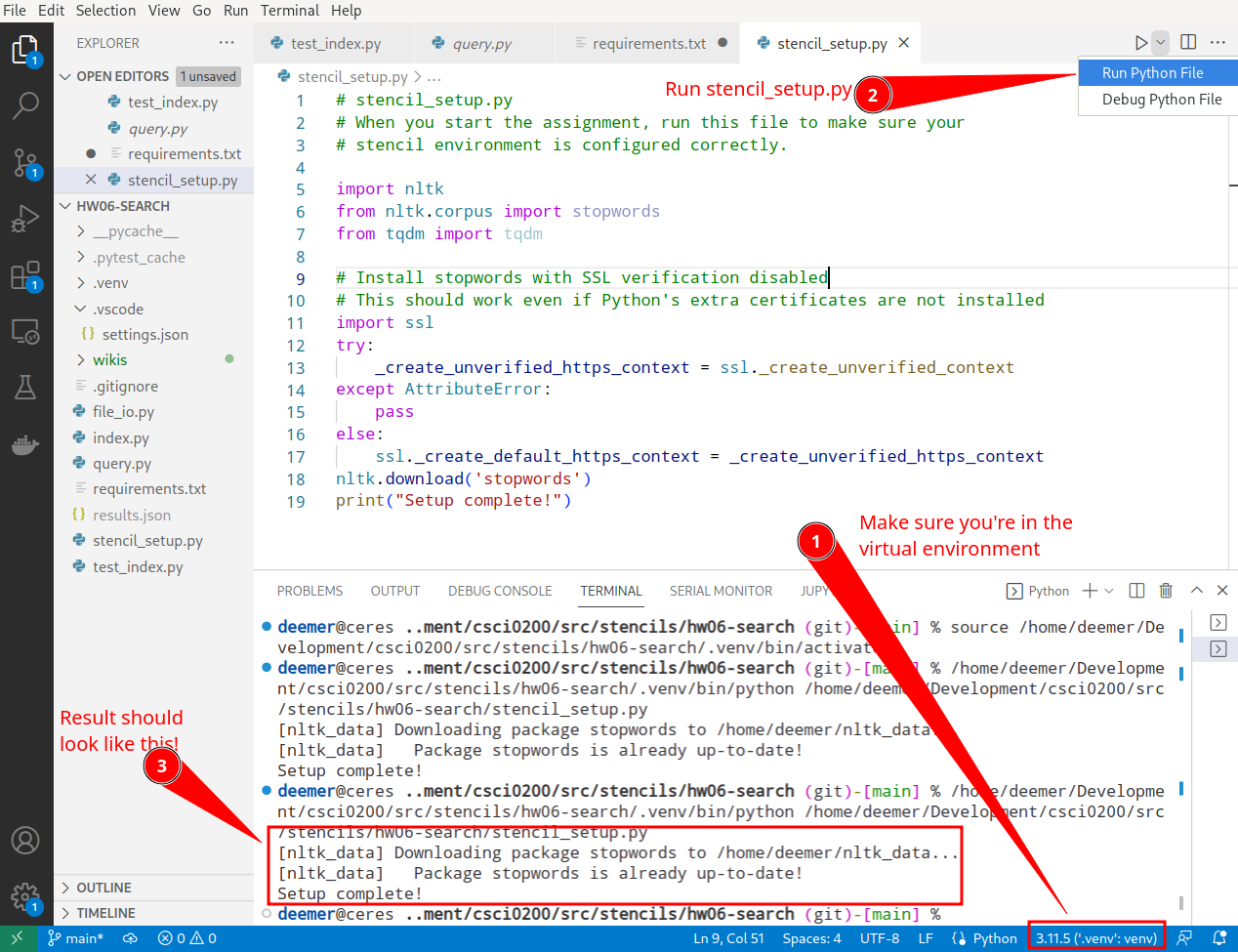
If your terminal says "Setup complete!" you should be good to go! If you encounter issues, make sure you have [set up your environment](https://docs.cs200.io/#Setting-up-your-environment) and check the steps in the [Troubleshooting guide](https://docs.cs200.io/s/python-stencil-setup-guide#Troubleshooting).
If you still have problems, you can keep working for now, but please come to office hours or post on Ed soon so we can help--you *will* need your environment working to run tests later!
</section>
**Various other resources: you may find helpful**
- **[Our Python Stencil setup guide](https://docs.cs200.io/s/python-stencil-setup-guide)**: for how to load the stencil
- **[Our guide for going to Python from Java](https://docs.google.com/document/d/1wwOL1PsgdfeAzv77m6iBNzwX0m9HV5i_nJoKKZad_tY/edit?usp=sharing)** which includes links to the Python documentation that you should refer to
- **[Our Python Testing Guide](https://docs.cs200.io/s/python-testing-guide)**: how to run and debug tests, as well as this [annotated VSCode debugging guide](https://brown-csci0200.github.io/assets/lectures/23python1/Lec25_whiteboard_f22.pdf) from lecture
- **[Our Python Style Guide](https://docs.google.com/document/d/1yadShv9w5oe_NWIt4fDk-DG_neBIy0AdX4mer2S0O3A/edit?usp=sharing)**: how to format your Python code
# Background
:::warning
**_Warning:_** Since this is the final homework of CS200, we are walking you through the starter code a bit less. When you get to parts of the handout that describe code we have given you, pause and read through the docstrings and code for the relevant methods.
There is also quite a bit of background that motivates and describes the algorithms you will be implementing in the homework – be sure to read the background first (and ask questions on Ed if something is not clear) so that you are prepared for the implementation portion of the assignment!
:::
A naive way to build a search engine would be to ask the user to enter a query, and then scan through the entire set of web pages looking for matches to that query. This approach would require many traversals of the web pages, one per query--which would be very slow.
Instead, most modern search engines consist of two programs, an _indexer_ and a _querier_. The indexer *preprocesses* known web pages before answering any queries, saving information about which documents are relevant to which words. Yes, this still takes a long time, but the crucial part is that it's done ahead of time (**before** the user does a query): so, if it takes one hour, or even one day, it does not negatively impact the user experience, because it does not affect query-response time.
This is an example of a **time vs. space trade-off**. You’ll use extra space to store the preprocessed information, but that enables your program to answer queries quickly.) When the querier receives a query from a user, it uses the information contained in the file(s) to _quickly_ respond to that query.
:::info
**Example**: Once built, an example run of your search engine might look like this--note the pre-processing step of running index.py).
*Note: Once you build your implementation, it's ok if your results do not exactly match this!!*
```
$ python3 index.py wikis/MedWiki.xml titles.txt docs.txt words.txt
$ python3 query.py titles.txt docs.txt words.txt
search> computer science
1 LEO (computer)
2 PCP
3 Junk science
4 Hacker (term)
5 Malware
6 Gary Kildall
7 Motherboard
8 Foonly
9 PVC (disambiguation)
10 Graphical user interface
search> pope
1 Pope Alexander IV
2 Pope Benedict III
3 Pope Clement III
4 Pope Gregory V
5 Pope Gregory VIII
6 Pope Gregory XIV
7 Pope Formosus
8 Pope Eugene II
9 Pope Alexander VIII
10 Pope
search> :quit
```
:::
## Search: the architecture
The following diagram summarizes the components of the search engine. The orange blocks are the inputs (the web pages and the query). The blue boxes are different components of the solution (which you will write). The white boxes are intermediate data that get produced and read by the blue boxes. The components split into two main parts (the indexer and the querier) which you can develop and test independently.

This looks like a lot of pieces, but **you only need to write code for the blue blocks**, which comprise the indexer and one small piece of the queries. Writing to/reading from the titles, words, and docs files, as well as most of the querier, have been written for you!
:::success
**What to expect**: The next sections will give background on how each part works and help guide your implementation. There's a lot of info here--both to help you work through the concepts and explain how the starter code works. **As you read don't panic--yes, there is a lot here, but you have the tools you need to understand it all.** You got this. :smile:
:::
# Indexing
**Terminology**: Your search engine will work with a _wiki_, or a collection of articles that follow a specific format and link to each other (Wikipedia is an example of a wiki). The documents of the wiki make up the _corpus_ that your search engine will search.
The indexer first reads in the name of the wiki file to be parsed, and the names of the titles, words, and docs files to be written to. **The starter code takes care of all of this for you**, so your job will to be to modify the indexer to:
1. Process an XML file into a list of terms,
2. Determine the relevance between terms and documents, and
3. Determine the authority of each document.
To do this, you will need to populate and make use of several data structures, which are described later in the handout.
## Wiki file format
The input wiki is in XML format, is a file format structured like a tree. More information about this format is found [here](https://www.tutorialspoint.com/xml/xml_documents.htm#:~:text=An%20XML%20document%20is%20a,structure%20or%20a%20mathematical%20equation).
XML uses an HTML-style angle bracket specification. Take a look at `SimpleWiki.xml` in the `wikis` directory of your stencil repo, which has commented annotations on the format of the XML file.
### Links
As you read the example, you should pay special attention to the format of *links*, which connect this wiki to another wiki in the corpus. Each link has two parts:
- **Text**: This is the text that would be shown to the user viewing the page ([like this](#Links))
- **Destination**: This specifies what page the link is referring to. If the destination is not specified, the destination has the same name as the text part.
For example, this link has a text part `(See this page)` and links to a page named `Example page`:
```
[[Example page|(See this page)]]
```
Here's a shorthand link notation for when the text and destination are the same. This link has text `Example page` and links to a page named `Example page`:
```
[[Example page]]
```
## Processing a wiki file
Your first task (described in detail below) will be to parse each wiki's XML file to extract *tokens*, which are the set of relevant words for that wiki that will be useful for building the search index. Conceptually, this process has two important steps:
- Extracting all the *words* from the wiki's XML. Words includes the body and title of the page, as well as the *text part* of any links
- Extracting relevant *tokens* from the words by 1) ignoring common words called *stopwords* (eg. “and,” “or,” and “the.”), and 2) performing [stemming](https://en.wikipedia.org/wiki/Stemming), which removes common word endings (eg. -ing, -s) so that words like "cooking", "cooks" and "cook" all count as the same word in the index
The starter code already includes most of the pieces to do these steps for you (just like many libraries do in the real world!)--it's up to you to connect these pieces together to process the document.
The next few sections describe the relevant parts of the stencil code--**skim these now and then come back as you need it for task 1-A**.
#### How to traverse a wiki file
The starter code loads in the wiki XML using the following two lines:
```python
wiki_tree = et.parse(input_file)
wiki_xml_root = wiki_tree.getroot()
```
You can loop through all of the pages of the wiki like this:
```python
for wiki_page in wiki_xml_root:
```
<details class="aside" style="padding-left: 20px">
<summary class="aside">Want a status bar to appear when you run this code?</summary>
To get a fancy status bar, add `import tqdm` at the top of your indexer file and then use `for wiki_page in tqdm(wiki_xml_root):` instead.
**This is an optional step, and you shouldn’t spend time troubleshooting it if installing** `tqdm` **doesn’t work. The TAs will not help you with** `tqdm` **in hours, to prioritize other debugging tasks.**
</details>
<br />
#### Collecting words
You'll need to collect words from different tags inside the XML file. To get the contents of a specific tag in a page (in this example, “title”), you can use:
```python
page_title = wiki_page.find("title").text.strip()
# Note: strip() removes any leading or trailing whitespace
```
:::info
**Note**: Remember to convert strings to other data types, such as ints, when appropriate!
:::
To convert the page text into a usable list of words, we have provided you with a *regular expression* that detects words and links (see the stencil code comments for a breakdown of this regex). For information on regular expressions, see [this section of Lab 9](https://docs.cs200.io/s/lab8#Regular-Expressions). An example use of this regular expression could be:
```python
cool_tokens = re.findall(self.tokenization_regex, "this is a cool string")
for word in cool_tokens: # "this", then "is", then "a"....
...
```
#### Extracting tokens: stemming, stopwords, and links
We have provided helper functions that can assist with stemming and removing stopwords. You should read the documentation in the code to see the exact inputs and outputs that these functions require:
- `stem_and_stop` : This method takes in a word and performs the stemming and stopping for you, using the [nltk Python library](https://www.nltk.org/), a common library for natural language processing (NLP).
- `word_is_link` and `split_link` : These methods help you check for links and parse out links, using parts of the regular expression we described above.
<section>
### Task 1-A
Using all of the stencil resources described in this section, write a method in the `Indexer` called `process_document` that takes in a document title, its id, and its body (anything that might appear between the \<text> and \</text> tags of a document) as strings and returns a list of all of the words that are _not stopwords_ in the body and title, after stemming.
For links, process and include only the *text* of the link, **not** the *destination* of the link. You should ignore links to pages outside of the corpus (i.e. links to a title that has no corresponding page in the corpus).
:::success
**Hint:** Be sure to reference [conceptual info and stencil resources](#Processing-a-wiki-file) above--these resources are here to help you!
:::
</section>
<section>
### Task 1-B
Write some tests for this `process_document` in `test_indexer.py`. You can ignore the existing functions in this file for now.
Because `process_document` does not depend on the fields of the indexer, you can pass in whatever example wiki and title/doc/word file names you want to the constructor. Ignore any output from the constructor for now, and only test the output of `process_document` for a given input.
You now have enough information and helpers to populate the `Indexer` data structures listed in the next section, which will be used later for computing rankings--each data structure have already been initialized as fields in the `Indexer` class starter code.
</section>
### Key `Indexer` data structures
:::success
**First time reading this handout?** This section serves as a reference of the most important data structures in the `Indexer`. If this is your first time reading the handout, it won't make sense why we need all of these yet--**skim over this section to get a sense of what is here and then remember it for later**. The next two tasks will guide you through building an example and start you thinking about how to populate the data structures.
:::
:::danger
**_Important:_** The code we have given you assumes you will populate these data structures with the correct kind of data.
Read these descriptions carefully to understand what the data structures contain – if you do not fill the structures up with the correct data, the wrong information will be written to the titles, words, and docs files, and your querier will not work!
:::
- `ids_to_titles`: a dict that maps page ids to page titles
- keys: page ids (int)
- values: page titles (string)
- `titles_to_ids`: a dict that maps page titles to page ids
- keys: page titles (string)
- values: page ids (int)
- `ids_to_links`: a dict that maps a page id to the pages it links to
- keys: page ids (int)
- values: a collection (**of your choosing (see note below)**) of page ids for pages that the page links to
- `words_to_doc_frequency`: a dict that maps words to how many times they appear in the page with a specific page id
- keys: words (string)
- values: dicts where the keys are page ids (int) and the values are the number of times the word appears in the document (int). If a word doesn’t appear in a page, there should not be a key with that page id in the inner dictionary.
- `ids_to_max_counts`: a dict that maps page ids to the maximum word count in the document
- keys: page ids (int)
- values: the number of times the document’s most frequent word appears in that document (int)
**Note**: *What is a good choice for the collection in `ids_to_links`? We want to quickly look up if a page with ID A links to a page with ID B, so make your choice with efficiency in mind._
The last three data structures will be used for calculations in subsequent sections of the assignment.
<section>
### Task 1-C
Make a (fairly small) `ExampleWiki.xml` file with at least two documents (pages) where:
- At least one document contains at least one link to another document in the wiki
- The text portion of each document is short (one sentence)
- Some words in the text portion are repeated within a document and across documents
The last bullet will be helpful for future examples (it will help to read the whole handout now, before making this example!). Remember that `SimpleWiki.xml` gives an example of the wiki format.
Write out exactly what key-value pairs each of these data structures will contain for this wiki, on paper or in a text file. You will add more to this file in the next section. You will turn in the wiki and file as part of your hand-in.
</section>
<section>
### Task 1-D
Modify the `parse` and `process_document` methods to populate the data structures. You should make no more than two passes through the corpus (that is, have two or fewer separate loops through the pages of the wiki). Your `parse` method should call `process_document` on each document in one of these passes. Note that `process_document` should change to have side effects (that is, should change the contents of some of the data structures), whereas previously it just returned a result with no side effects.
:::warning
<details>
<summary><b>Stop and think: </b> Why do you need two passes through the corpus?</summary>
Hint: does having one (or more) of the above data structures fully populated first help populate later data structures? Think carefully about the best “order of operations” before you continue implementing. In the docstring for <code>process_document</code>, document the assumptions that <code>process_document</code> now makes about the contents of the data structures.
</details>
:::
</section>
### Testing the Indexer
Now you have enough code to test the titles file! Notice that the Indexer’s `run` method calls `parse`, and then writes the contents of `ids_to_titles` to the titles filename (`titles.txt` below). Right now you won’t have anything meaningful written to the docs and words files, but we can test the contents of the titles file. To start, we can try to test using a terminal, and then we can speed up the process by writing tests.
#### Testing from a terminal
We can test the Indexer from a terminal, as follows (for general instructions on running Python from a terminal, see [here](https://docs.cs200.io/s/python-stencil-setup-guide#When-you-need-it-Running-Python-from-a-terminal)):
```python
python index.py wikis/SimpleWiki.xml titles.txt docs.txt words.txt
```
From here, we can examine the contents of the titles file (`titles.txt`), which should look something like the following (though your lines may be in a different order):
```
200::Example page
30::Page with links
```
In each line, the page ID is associated with the title of the page using `::` as a [delimiter](https://www.merriam-webster.com/dictionary/delimiter#:~:text=de%C2%B7%E2%80%8Blim%C2%B7%E2%80%8Bit,of%20a%20unit%20of%20data).
#### Writing indexer tests
Instead of manually inspecting each file, we can write tests to do this check automatically. The test\_indexer.py file has an example of this, which you can uncomment now (be sure to also uncomment `file_as_set`). `file_as_set` returns a `set` of all of the non-empty lines in the file, because the order in which lines appear in the titles file is arbitrary.
```python
def test_file_contents():
simple_index = Indexer("wikis/SimpleWiki.xml", "simple_titles.txt",
"simple_docs.txt", "simple_words.txt")
simple_index.run() # run the indexer to write to the files
titles_contents = file_as_set("simple_titles.txt")
assert len(titles_contents) == 2
assert "200::Example page" in titles_contents
assert "30::Page with links" in titles_contents
```
:::warning
**Warning (keep in mind for later testing):** The `run` method of the Indexer calls parse and then writes to the output files, so it should only be called in the test functions where you want to run the entire indexer from beginning to end and inspect the result. If you want to unit-test the outcome of individual methods, it will be more efficient to just call `parse` and then those methods (as we will discuss in the next section).
:::
<section>
### Task 1-E
Try running your Indexer from the terminal, as shown above--your titles file should look similar to the example.
After checking in a terminal, write a test function to test the contents of the titles file for your example wiki.
</section>
# Determining the Relevance of Documents to Terms (TF and IDF)
Processing documents as described (parsing, tokenizing, and stemming) converts documents from text into a sequence of terms. Likewise, a query (after parsing, tokenizing, and stemming) is a sequence of terms. Consequently, to score the relevance of a document to a query, we compare these two sequences of terms. Similarity metrics used by most practical search engines capture two key ideas:
- A term that appears many times within a document is likely to be more relevant to that document than a term that appears fewer times. This notion is called the **Term Frequency**.
- A term that occurs in fewer documents in the corpus is likely to be a better signal of relevance when it occurs than a term that appears in many documents. This notion is called **Inverse Document Frequency**.
:::info
**Example corpus**: To explain these terms, we will use the following small example, which will appear in these blue boxes.
Consider a corpus consisting of the following three documents (assume we are leaving stop words in for now and ignoring page titles/stemming
- document 1: the dog bit the man
- document 2: the dog ate cheese
- document 3: the cheese bit the cheese
Our corpus therefore contains the words {“the”, “dog”, “bit”, “man”, “ate”, “cheese”}. The next sections will compute Term Frequency and Inverse Document Frequency for this corpus.
_\* If you are using the test\_tf\_idf.xml wiki to test, keep in mind that the numerical results from these examples will change when you remove stop words and include the page titles as terms in the corpus.\*_
:::
#### Term frequency (tf)
Given a list of all the terms that occur across all of the documents, one can count how many times each term appears in each document. These raw counts are only so useful for comparing documents, however: the term “cat” might appear less often in one document simply because the document is very short. We therefore must normalize the frequency of counts across the documents. We can do this by dividing the count of a term by the count of the most frequently used term in the same document. This is called the **term frequency (tf).**
**Word to ids to counts**
:::info
For each document, we can create a mapping of words to their counts, like this:
| | the | dog | bit | man | ate | cheese |
| ------ | --- | --- | --- | --- | --- | ------ |
| doc. 1 | 2 | 1 | 1 | 1 | 0 | 0 |
| doc. 2 | 1 | 1 | 0 | 0 | 1 | 1 |
| doc. 3 | 2 | 0 | 1 | 0 | 0 | 2 |
in documents 1 and 3, the maximum word count is 2. In document 2, the maximum word count is 1.
With this information, we can compute the tf of each word and page:
<details>
<summary><b>Click to expand</b></summary>
| | the | dog | bit | man | ate | cheese |
| ------ | ----------- | ----------- | ----------- | ----------- | ----------- | ----------- |
| doc. 1 | 2 [tf: 1.0] | 1 [tf: 0.5] | 1 [tf: 0.5] | 1 [tf: 0.5] | 0 [tf: 0.0] | 0 [tf: 0.0] |
| doc. 2 | 1 [tf: 1.0] | 1 [tf: 1.0] | 0 [tf: 0.0] | 0 [tf: 0.0] | 1 [tf: 1.0] | 1 [tf: 1.0] |
| doc. 3 | 2 [tf: 1.0] | 0 [tf: 0.0] | 1 [tf: 0.5] | 0 [tf: 0.0] | 0 [tf: 0.0] | 2 [tf: 1.0] |
</details>
<br />
_Note that any word/doc pair that has a tf of 0 should not appear in the structure that is returned by `compute_tf`, to save memory space for large corpuses._
:::
<section>
### Task 2-A
Write out what the tf of each word/page pair in your test wiki should be. Use this to **write a unit test for the `compute_tf`** method. This test should:
- Initialize an `Indexer` object with the test wiki as an input
- Call `parse()` on that object (**do not call** `run()`**!**)
- Call `compute_tf()` and test the contents of the returned dict against expected values
**If you try to run this test right now, it will not pass yet**--in the next task, you'll implement `compute_tf`.
</section>
<section>
### Task 2-B
Implement the `compute_tf` method. **You should make use of the data structures you populated in task 1-D to make this efficient. If you do this, the method can be accomplished using a double for-loop.** Test and debug this method.
</section>
#### Inverse document frequency (idf)
To capture the second idea, we want to scale up the relevance of words that occur in fewer documents in the corpus. One useful scaling factor, called **inverse document frequency_ (idf)**, which is computed as follows:
Let i be a term in the corpus, n be the total number of documents, and ni be the number of documents that contain term i. Then, the quantity n/ni will be larger for words that appear less often in the corpus. We use the natural log, ln, to make this ratio less sensitive to larger values of n/n<sub>i</sub> and define idf<sub>i</sub>=ln(n/n<sub>i</sub>)
:::info
<details>
<summary>Example corpus: now with i and idf</summary>
| _i_ | the | dog | bit | man | ate | cheese |
| ---- | --- | ----- | ----- | ----- | ----- | ------ |
| n<sub>_i_</sub> | 3 | 2 | 2 | 1 | 1 | 2 |
| idf<sub>_i_</sub> | 0 | 0.405 | 0.405 | 1.099 | 1.099 | 0.405 |
</details>
:::
<section>
### Task 2-C
Write out what the idf of each word in your test wiki should be. Use this to write a unit test for the `compute_idf` method, similarly to how you approached task 2-A above.
</section>
<section>
### Task 2-D
Implement the `compute_idf` method. Again, make use of the data structures you populated in Task 1-D. Test and debug this method.
Finally, **term relevance** is simply the product of the two scores for any term/page pair: for a term _i_ and a document _j_: relevance<sub>ij</sub> = tf<sub>ij</sub> * idf<sub>i</sub>
:::info
<details>
<summary>
Example corpus: term relevance
</summary>
| | the | dog | bit | man | ate | cheese |
| ------ | --- | ----- | ----- | ----- | ----- | ------ |
| doc. 1 | 0 | 0.203 | 0.203 | 0.549 | 0 | 0 |
| doc. 2 | 0 | 0.405 | 0 | 0 | 1.099 | 0.405 |
| doc. 3 | 0 | 0 | 0.203 | 0 | 0 | 0.405 |
This table shows us, for example, that “dog” is more relevant to document 2 than document 1, (since it appears more often relative to other words in the document). Also note that “the” has no relevance, because it appears in all of the documents.
:::
</details>
</section>
<section>
### Task 2-E
Write out what the relevance of each word/document pair in your test wiki should be. Use this to write a unit test for the `compute_term_relevance` method.
</section>
<section>
### Task 2-F
Implement the `compute_term_relevance` method. This method should call `compute_idf` and `compute_tf` and use the return values of those methods to arrive at an answer. Test and debug this method.
:::success
**_Note:_** Notice that the `run` method calls `compute_term_relevance` and uses the result to write the words file.
This means that you shouldn’t be calling `compute_term_relevance` anywhere else in the Indexer class--the stencil code stitches these methods together for you. Calling `compute_term_relevance` directly for unit tests is fine, because the point of unit testing is to test methods individually.
:::
</section>
<section>
### Task 2-G
Manually check that the output of the words file is reasonable by running the indexer from the terminal.
<details>
<summary>Here's what the words file should look like for <code>SimpleWiki.xml</code></summary>
```
exampl 200 0.0 30 0.0
page 200 0.0 30 0.0
content 200 0.23104906018664842
may 200 0.46209812037329684
contain 200 0.46209812037329684
space 200 0.23104906018664842
format 200 0.23104906018664842
special 200 0.23104906018664842
charact 200 0.23104906018664842
regular 200 0.23104906018664842
express 200 0.23104906018664842
give 200 0.23104906018664842
extract 200 0.23104906018664842
word 200 0.23104906018664842
number 200 0.23104906018664842
document 200 0.23104906018664842
link 30 0.23104906018664842
see 30 0.23104906018664842
```
</details>
</section>
# Page Rank
One could determine which documents are relevant to a query just by comparing the terms in the query to those in the documents. This is how search engines used to work. Then in the 1990s, Google was founded using a different approach based on the PageRank algorithm (designed by the founders). The algorithm ranks pages based on the links among them (without considering the content), with pages that get linked to by other pages (more “authoritative” pages) getting priority in the results.
### Key principles
Here are the key principles underlying the design of PageRank (we will give you the math/algorithms that enforce these principles):
1. **The more pages that link to a page j, the more authoritative j should be.** For example, if “Blog Brown” is linked to by 5 web pages, and the Wikipedia article on “Providence, Rhode Island” is linked to by 500 pages, then it makes sense to consider the Wikipedia article more authoritative.
2. **The more authoritative those pages are, the still more authoritative j should be**. Now, if “Providence Place Mall” is linked to only by “Providence, Rhode Island”, and “Blueno” is linked to only by “Blog Brown,” it might not be enough to measure a page’s authority simply by a count of the number of pages that link to that page. Indeed, it makes sense to consider “Providence Place Mall” more authoritative than “Blueno” since it is linked to by a more important page.
3. **The fewer links those pages have to pages other than j, the more authoritative j should be.** Assume “Research at Brown” is linked to only by a “NYTimes” article which links to only 10 other pages, while “Why Brown?” is linked to only by “Blog Brown”, which links to 200 other pages. Because the "NYTimes’’ page has only a few links, and “Brown Blog” has many links, a link from the “NYTimes” page can be considered to be more important than a link from the “Brown Blog”, leading us to attribute more authority to “Research at Brown” than “Why Brown?”
4. **The closer j is to another page k (measured by the number of links that must be followed to get from j to k), the more k’s score should influence j’s.** For example, if the average path from “Brown University” to “Boeing” is 100 links, and the average path from “Brown University” to “Amy’s Personal Website” is 5 links, then all other things equal, Amy’s page should be considered more authoritative than Boeing’s.
PageRank uses these principles to compute the authority of each document. The algorithm works roughly as follows: Each page’s authority is a number between 0 and 1, where the total authority across all documents always equals 1. The algorithm starts by assuming that all documents have the same authority. Then, following the principles, the algorithm updates the authorities based on the links between pages. Since the authority of one page can affect that of another, this process of refining authorities repeats until the authorities stabilize across all documents (the underlying mathematics guarantee eventual stabilization). It is important that the total authority in the system is conserved, so at any point in the converging sequence of page ranks, the total authority in the system will always sum to 1.
Here is a [YouTube video on how PageRank works](https://www.youtube.com/watch?v=P8Kt6Abq_rM) that you might find useful when implementing the assignment.
:::info
**_Note:_** For our example that explains PageRank, say there are three websites (A, B, C), where:
- A links to B and C
- B links to no pages
- C links to A
Then, we can represent the relationships between A, B, and C pictorially:
<img src="https://lh6.googleusercontent.com/VDW3dvmRWQgMYi2PeHZ7kdTOUM4Hf0c--Bo4zwRyhjLkOX5IWcNS-jpUI5He39Kw_VCo71HAo60e9spnxZwMHBVlVFQ98DHkHCE_ztyzCLcMxq9LxDNxUROjYj00xgDBsNANqYgZ5it03JAgo512yTY" width="200"/>
:::
### Ranking with weights
In order to determine the rank of a page, we need to first numerically represent the linking relationship between pages as a set of weights. This will help achieve the third principle, and, when combined with the remaining math in this section, the fourth principle. **We provide you the code that computes this**, according to the following formula. We give you the background here so that you can use it for unit testing.
If j and k are pages, then we compute _the weight that k gives to j as wkj, where:
- n is the total number of pages
- nk is the number of (unique) pages that k links to
- ε is a small arbitrary number (we pick 0.15 for this assignment):

The weighting should also follow these special cases:
- Links from a page to itself are ignored.
- Links to pages outside the corpus are ignored.
- Pages that link to nothing are considered to link (once) to everywhere except to themselves.
- Multiple links from one page to another are treated as a single link.
:::info
For our example, we first address the special cases:You can check for yourself that
w<sub>AB</sub>=w<sub>AC</sub>=w<sub>BA</sub>=w<sub>BC</sub>=0.475,
w<sub>CA</sub> = 0.9, and
w<sub>AA</sub>=w<sub>BB</sub>=w<sub>CC</sub>=w<sub>CB</sub>=0.05
From this, we can see that C lends a lot of authority to A, because A is the only page C links to.
:::
<section>
### Task 3-A
Read through the `compute_weights` method. What does it return? For a page with id j and a page with id k, how would you get wkj from the return value of this method?
**Now is the time to check your understanding of the distinction between wkj and wjk, to avoid misconceptions/bugs later.**
:::danger
**_Important debugging note:_** `compute_weights` depends on `ids_to_links` being populated correctly. If you are encountering issues with your PageRank code, it is likely that `ids_to_links` is not being filled correctly.
To understand what is happening, run the debugger and observe what your `ids_to_links` is. Does it match the following assumptions that `compute_weights` makes?- The keys are page ids, and the values are collections of the **unique** page ids **within the corpus** that the page links to (for example, do not put None in this collection if a page is outside of the corpus; simply ignore it)
- If a page does not link to anything, the id should not appear as a key in `ids_to_links` (This is so that the third special case is handled correctly – see the `num_links` computation in `compute_weights`)
:::
</section>
### How to compute ranks
As we will see, we will compute the ranks for the pages as one step of the PageRank algorithm, and then use those values when computing the next step of the algorithm, until we converge to some stable ranking. We first define the math for a single iteration (step) of this algorithm.
For a page j, the rank r<sub>j</sub> on the (i+1)-th iteration is defined as follows (here, superscripts with angle-brackets (⟨⟩) denote the iteration number, not an exponent):

In other words, the rank of a page j is the sum of the ranks of each page k from the _previous iteration_ multiplied by the weights that each k gives to j. Remember that wkj does not change between iterations.
In the base case, we initialize the ranks as:

For our example, initially:
r<sub>A</sub><sup>⟨0⟩</sup>=r<sub>B</sub><sup>⟨0⟩</sup>=r<sub>C</sub><sup>⟨0⟩</sup> = $\frac{1}{3}$
And then,
r<sub>A</sub><sup>⟨1⟩</sup>=w<sub>AA</sub> * r<sub>A</sub><sup>⟨0⟩</sup>+w<sub>BA</sub> * r<sub>B</sub><sup>⟨0⟩</sup>+w<sub>CA</sub> * r<sub>C</sub><sup>⟨0⟩</sup> = (0.05)$\frac{1}{3}$ + (0.475)$\frac{1}{3}$ +(0.9)$\frac{1}{3}$ = 0.4750
Similarly, r<sub>B</sub><sup>⟨1⟩</sup> = 0.1916 and r<sub>C</sub><sup>⟨1⟩</sup> = 0.3333
The next iterations for this example are computed in the following section.
</details>
<section>
### Task 3-B
For each iteration, you should store the ranks in a dict that goes from page ids to floats. Let’s call this dict `ranks`. Also say that you’ve stored the result of `compute_weights` in a dict called `w`.
Write down the lines of code (likely using a for-loop) that computes the contents of `next_ranks` based on contents of `ranks`. `next_ranks` should have the same keys that `ranks` has (that is, all of the page IDs in the corpus). You don’t have to turn anything in for this task, but it will help you work through later tasks.
</section>
### Converging on ranks
We repeat the rank computation until the computation _converges_, that is, the distance between two iterations is a sufficiently small amount. For our distance metric, we use the [_Euclidean distance_](https://en.wikipedia.org/wiki/Euclidean_distance) between two vectors. The code to compute this is also given for you, in the `distance` method.
Once the distance between r<sup>⟨i⟩</sup> and r<sup>⟨i+1⟩</sup> is sufficiently small (less than =0.001), you can declare the rankings stable, and output r<sup>⟨i+1⟩</sup> as your final ranking.
:::info
For our example,
| iteration | rank(A) | rank(B) | rank(C\) | distance |
| --------- | ------- | ------- | ------- | -------- |
| 0 | 0.3333 | 0.3333 | 0.3333 | \- |
| 1 | 0.475 | 0.1916 | 0.3333 | 0.2003 |
| 2 | 0.4148 | 0.2519 | 0.3333 | 0.0851 |
| 3 | 0.4404 | 0.2263 | 0.3333 | 0.0362 |
| 4 | 0.4295 | 0.2372 | 0.3333 | 0.0154 |
| 5 | 0.4341 | 0.2325 | 0.3333 | 0.0065 |
| 6 | 0.4322 | 0.2345 | 0.3333 | 0.0028 |
| 7 | 0.433 | 0.2337 | 0.3333 | 0.0012 |
| 8 | 0.4326 | 0.234 | 0.3333 | 0.0005 |
Since the distance between iterations 7 and 8 is smaller than 0.001, the ranks at iteration 8 are the final values.
:::
<section>
### Task 3-C
Examine the code for `distance`. What should the inputs to distance be, to compute the distance between r<sup>⟨i⟩</sup> and r<sup>⟨i+1⟩</sup>, using the variable names from Task 3-B?
</section>
<section>
### Task 3-D
The pseudocode for `compute_page_rank` has been given to you in the stencil code. Implement the pagerank algorithm. Note that `run` calls compute\_page\_rank, so you do not have to call it from anywhere else in the code.
:::warning
Remember the difference between using = and copying over an object such as a dictionary in memory
:::
</section>
<section>
### Task 3-E
We’ve provided you with several sample wiki files to help test and debug the results of your PageRank implementation.
<details>
<summary><b>Expand for more info on testing
</b></summary>
- PageRankWiki.xml is a wiki where every page links only to a single page (page 100)
- PageRankExample1.xml captures Example 1 from above
- PageRankExample2.xml captures Example 2, illustrated here:
:::info

rank(A) = 0.2018. rank(B) = 0.0375. rank(C\) = 0.3740. rank(D) = 0.3867.
:::
Use these examples to test your implementation. Remember to first call `parse` on the `Indexer` object (so that the linking relationships are populated) before calling `compute_page_rank`. Make at least two more example wikis to test `compute_page_rank`, specifically.
:::info
**_Note:_** The best way to test your PageRank is to verify that it is outputting the exact values (within some small floating-point error) as shown for the two worked examples. It will be very helpful to step through the debugger and verify that the weights are being calculated correctly and that the sequence is converging. Also remember that the sum of the ranks across all pages should be 1.To customize the error margin for pytest.approx, use the optional abs argument:`assert rank[1] == pytest.approx(0.4326, abs=0.0001) # or abs=1e-4`
PageRankWiki can also be useful as a sanity check to show that your program gives a much higher weight to page 100 than any other page.
:::
</details>
</section>
### Task 3-F
Manually check that the output of the docs file is reasonable for your wikis by running the indexer from the terminal--see [this section](#Testing-the-Indexer) for an example on how to do this.
For reference, here is the output of the docs file for SimpleWiki.xml:
```
200 0.49999999999999994
30 0.49999999999999994
```
# Additional wiki files
For the next part, we’ll use some large datasets that are actually too big to store in Github! To use them:
1. **Download the following files**: Google Drive may display a warning about these files, just click okay to download them.
- [MedWiki.xml](https://drive.google.com/file/d/19Wr05lN_mvBagWbK1mFo6IQLTT6ZAr8G/view?usp=sharing)
- [BigWiki.xml](https://drive.google.com/file/d/1RdGSLfBvMH2U1UDRh8GqAMIA0YLrSNLt/view?usp=sharing)
2. **Place both files in the** `wikis` **folder** **inside your stencil.** Make sure you don’t skip this step, as our stencil code assumes these files are located here!
Our autograder will run your indexer on these wikis to check that your code does not time out and does not run out of memory. If you are having trouble with time/space limitations, try to find ways to reduce the number of loops in your indexing and remove any redundant data objects you may have (ex: remove duplicate copies of dictionaries/lists you may have).
:::warning
**Warning:** Do NOT try to add `MedWiki.xml` or `BigWiki.xml` to your repository, or you will not be able to commit/push to Github as the files are too large. Git will complain if you try to do this, because we’ve set it up to not allow you to add these files!
:::
# Querying
The second big piece of the search engine is the Querier. The Querier does the following:
- Parses in arguments for the index files and an optional argument that says to use PageRank
- Runs a REPL that takes in and processes search queries
- Scores documents against queries based on the term relevance and PageRank (if specified) index files
Most of the querier is written for you. You will implement the ranking function that affects the order of the results.
<section>
### Task 4-A
Read through the Querier code to get an idea of what it is doing, and how it is doing it.
</section>
<section>
### Task 4-B
Implement the `ranking_function` method according to the docstring. Experiment with different ways of combining term relevance and PageRank (adding, weighted sum, multiplication…). When we are grading your code, we just want you to show that you can put page rank and relevance together in a way that results in meaningful rankings. Any choice of combination that obeys that is fine.
</section>
<section>
### Task 4-C
Manually test the querier by running using different index files (generated from different wikis) and different queries. See [Running the Querier](#Running-the-Querier) for instructions on how to do this.
Find a case where the same query, run on the same index files generated from `SmallWiki.xml`, yields meaningful but different results when you change the way you combine term relevance and PageRank in `ranking_function` (“meaningful” here means that you shouldn’t just return 0 in ranking\_function and call it a day).
Take screenshots of the two results and include them in the file you started in Task 1-C. Include a few sentences on what the two different ranking functions were and why they might have yielded different results. Save this file (including your answer to task 1-C) as `hw6_written.pdf`.
</section>
# Running Search
## Running the Indexer
To run the indexer, use the command you used in task 1-E:
```
python index.py <wiki file> <titles file> <docs file> <words file>
```
Make sure that the tiles, docs, and words files do not exist (unless you want to overwrite them).
As long as your indexer is complete, you only have to run this command once per wiki to generate all of the information the querier needs.
:::warning
**Warning:** If you are getting issues like `LookupError` or errors about “stopwords” not being found, please make sure you can run the [stencil setup file](#When-you-start-setting-up-your-stencil), which configures your environment.
:::
## Running the Querier
To run the querier, make sure you have generated a titles, docs, and words file for a specific wiki using the indexer and run:
```
python query.py [--pagerank] <titles file> <docs file> <words file>
```
:::danger
**Note**: The `[ ]` around `--pagerank` means that it is an optional flag--this is a common convention for describing how to run things in a terminal. Include it only if you want your querier to take into account pagerank. **Do not include the brackets in your call.**
:::
Once the querier runs, you can then type in queries (or “:quit” to quit). For an example of what it should look like, see the example toward the bottom of [this section](#Background).
# Testing
The tasks above walked you through the Indexer methods you should test. You do not need to turn in any tests for the querier.
Submit your `test_index.py` file **and any test wiki files that your tests depend on** to the **Homework 6: Testing** assignment. Like other wheat/chaff testing, we will check your test suite against some broken implementations. The wheat/chaff tester contains a total of 18 chaffs--**for full credit on wheat/chaff testing, you are only required to catch 12 of the chaffs**.
:::warning
**_Warning:_** When submitting your test files, make sure you adhere to the following guidelines:
- Don’t include tests for any helper methods you wrote (you can test those in a separate testing file)
- Make sure that the testing file assumes all wiki files are in the wikis folder and are referred to by relative paths, e.g. `Indexer("wikis/SimpleWiki.xml", ...)`
- Do not access fields from the `Indexer` class directly--instead, use only the provided helper methods. If you don't do this, your tests won't work when we run them on our solution version!
- Don't include tests in your submission that parse BigWiki/MedWiki (they will cause the autograder to time out no matter what because it would have to run this for every chaff)
:::
# Thinking about Neutrality, Bias, and Monopolization
<section>
### Task 5-A
Read an excerpt from [Algorithms of Oppression: How Search Engines Reinforce Racism](https://drive.google.com/file/d/1KJTfUQSQLncrJ2roAmzQr1BNmdi8Vg7i/view?usp=sharing) by Safiya Umoja Noble (**pages 1-10**). Full book can be found for free [here](https://www.dropbox.com/s/gxg3j8psneot7t3/Noble_Algorithms%20of%20Oppression.pdf?dl=0).
:::warning
Content Warning for 5-A: discussion of racism, sexism, pornographic content, racial fetishization. If you don’t feel comfortable doing this reading (which is completely valid, it’s heavy content) please email _[_cs200-profs@brown.edu_](mailto:cs200-profs@brown.edu)_, and we’ll supply you with a substitute reading.
:::
If you try Noble’s searches today, for the most part you’ll find that Google has altered the results to be less biased. Still, the problems of biased results and content appearing at the top of the page persist. Instances of bias in search are not limited to racist results, but extend to questionable advertising, misleading scientific information, and stereotypes or misinformation about other identity groups.
</section>
<section>
### Task 5-B
Navigate to [Google](https://www.google.com) and try out these searches! Test them in incognito too and see if that changes your results.
- Search for “is climate change fake?”
- Search for “buy insulin”
- Search for a term that relates to your identity (if you’re comfortable).
:::success
**_Note:_** For all tasks in this section, write your responses in a doc that you’ll submit on Gradescope as **hw6_written.pdf**.
:::
</section>
<section>
### Task 5-C
In **2-3 sentences**, analyze your search results by combining Noble and your perspective.
</section>
## Thinking about the role of search engines
In his paper [Speech Engines](https://scholarship.law.cornell.edu/cgi/viewcontent.cgi?article=2622\&context=facpub), James Grimmelmann outlines three competing theories of the role of search engines:
**Conduit theory**
The conduit theory stipulates that the law should prevent Google from using its “dominant position” to “censor” websites. It draws on the tradition in free-speech theory that speakers should have an affirmative right of access to the mass media. Since search engines have the same power as traditional mass media to shape public discourse, goes the argument, they should be subject to the same scrutiny and regulations. Search should be passive and neutral, connecting users to information and nothing more.
**Editor theory**
The editor theory argues that search engines are “media companies” that make “editorial choices” about what to publish. Advocates believe that there is no such thing as “neutrality” in search because any ranking is innately biased, and that attempts to achieve neutrality or fairness through regulation are thus futile. Search should be “an active and opinionated editor” that harnesses its power to find the most important and interesting material.
**Advisor theory**
The advisor theory presents the analogy that a search engine should be a helpful, trustworthy advisor. An ideal advisor would adopt the user’s goals and preferences, rather than having an agenda of its own. Search should be listener-oriented: instead of attempting to amplify good speech, the engine should empower users to identify for themselves the speech they wish to hear.
<br />
<section>
### Task 5-D
In **3-4 sentences**, answer the following two questions:
Which theories do you think that Noble would most support? Which theory do _you_ think search engines should aim for?
</section>
## Analyzing our Search Project for Bias
<section>
### Task 5-E
Now let’s think about our Search project in this context.
Consider the following questions and add your responses to your doc/text file:
1. Considering the prompt above, write a paragraph detailing one problem area within your Search project where you could see algorithmic oppression arising. Be specific when explaining the problem, by analyzing the technical specifics of your implementation, doing a brief stakeholder analysis, considering a case study/example, or bringing in outside sources. For our purposes, you can imagine that your search implementation has a small but diverse user base. Consider which of Grimmelmann’s theories best reflects your search in framing your problem. We’re looking for nuance and careful articulation of your problem. (**6 - 8 sentences**)
2. Now, write a second paragraph proposing a potential change you could make to the Search project or implementation that would reduce or mitigate the problem you’ve outlined above. This need not be limited to only the code you’ve written, but can be related to systemic issues. Explain clearly why you think this change addresses your problem and how you expect it might help. Once you’ve outlined your proposed change, take a few sentences to analyze and critique it. What could go wrong? How might it be ineffective? Are you making tradeoffs between groups of stakeholders and are they justified or fair? Could you accidentally reproduce the algorithmic bias you’re trying to address? (**6 - 8 sentences**)
<br/>
:::info
We are looking for creative and strong argumentation here that shows your depth of thought and problem-solving skills (show us what you’ve learned over the semester - you could think about reformist reforms, tradeoffs, stakeholders, structure of data, privacy, etc ).
:::
</section>
# Handing in
To hand in your homework, submit the following files to **Homework 6: Implementation** on Gradescope:
- `index.py`
- `query.py`
- `hw6_written.pdf`
In addition, please submit the following files to the **Homework 6: Testing** submission on Gradescope:
- `test_index.py`
- Any wiki files you created
For more guidance on testing, please see the [Testing](#Testing) section.
# Grading
1. **Implementation (Autograded)** (45%)
2. **Testing** (20%): We run your tests on 18 chaffs. You are expected to pass the wheat and catch **any 12 of the chaffs**.
3. **Style, design, and code structure** (25%): The TAs will manually grade your work according to some rubrics. To earn the points for this part of the homework score:
- Follow every part of our [Python style guide](https://docs.google.com/document/d/1yadShv9w5oe_NWIt4fDk-DG_neBIy0AdX4mer2S0O3A/edit?usp=sharing)
- Follow the design considerations listed for each task
4. **Discussion on bias in search engines** (10%): You’ll submit a written response to some questions in this part, see [this section](#Thinking-about-Neutrality-Bias-and-Monopolization) for details on what to submit for each question