771 views
owned this note
# Association & Inheritance/Interface Diagrams Guide
## What are these diagrams and why are they important?
Association and inheritance/interface diagrams are depictions of relationships between the different kinds of data and types in a program. They allow the programmer to organize and think through the design of their project before beginning to code.
Having a good design and being able to discuss it with others will decrease your time coding the project and make debugging easier. Before some projects, we will have you consider the design and create association diagrams. This will start your thinking on how to code the project and also ensure you have a good design before you struggle for hours coding a project with a bad design!
## Creating a Diagram
Your association and inheritance/inferface relationships should be represented in one diagram. You should not draw a separate diagram for each.
### Tools to Use (choose one)
1. Google Docs/Google Drawings: We recommend using Google Docs to draw your diagrams. You can make the diagrams by pressing Insert → Drawing and then create your diagram on that page.
2. Hand Drawn: If your diagrams are hand drawn, you **must upload a picture** of the diagram to the document with the rest of your written answers, not as a separate file (unless otherwise stated). It is your responsibility to ensure the picture is clear enough for the TAs to read. If the picture or drawing is not clear, then you will not receive points for the diagram.
3. Third Party Software: There exists third party software such as [UMLet](https://www.umlet.com/) that will help you draw diagrams, but these are hard to set up and complicated to use. They are completely valid options, but not recommended. If you choose to use third party software, the staff can try and help you, but it is mainly your responsibility to get the software to work and learn how to use it.
### The Symbols
Below is a chart of all the different symbols you can use in your diagrams and what they mean. We expect you to follow this table when making the association and inheritance/interface diagrams.
| Symbol | Name | Use |
| :-----------------------------------------------------------------------------------------------------------------------------------------------------------------------------------------------------------------------------: | ---------------------- | ------------------------------------------------------------------------------------------------------------ |
|  | Concrete Class Box | Classes are represented by a box with its name. “Concrete classes” are classes that can be instantiated. |
|  | Abstract Class Box | Abstract classes are represented by a box with its name in italics. |
|  | Reference Arrow | Indicates that a class (ClassA) has a reference to — “knows about” — the class the arrow points to (ClassB) and scope of the reference is the entire class (i.e., it's stored in an instance variable). This reference can be created by instantiating an instance of ClassB within ClassA, passing an instance of ClassB as an argument to ClassA's constructor, etc. |
|  | Inheritance Arrow | This means that ClassA extends or inherits from ClassB. |
|  | Interface Circle | ClassA implements InterfaceB. |
<br>
## Example
Below is an example of an association and inheritance/interface diagram that represents code for an appointment.
The **Appointment** class has fields for a **Doctor** and **IDateTime**, and it stores references to them as instance variables. Thus, **Appointment** has references to these classes, and the diagram has reference arrows to **Doctor** and **IDateTime**. Though not used in this example, reference arrows can point both ways if both classes have references to each other.
Say we choose to implement the **IDateTime** interface with a **DateTime** class, and our **Appointment** class ends up instantiating a **DateTime** object. We represent the interface with an empty circle, and indicate the classes that implement the interface with a line connecting them to the circle. Note that even though we use a **DateTime** object for the **IDateTime** field, the reference arrow from **Appointment** still points to **IDateTime** because the **Appointment** class requires an object of type **IDateTime** for the field, regardless of our specific implementation. The reference arrow should point to the declared type rather than the actual type we choose to implement.
**Person** is an abstract class representing any generic person. We represent an abstract class using italics. The **Doctor** class extends **Person**, since a doctor is a more specific example of a person. We represent the inheritance relationship with an open arrow pointing from the subclass to the superclass.
Suppose that a **Hospital** class is later created, and it does not store any of the above classes or interfaces as a field. However, it has a method that takes in a list of appointments as a parameter. Even so, no association arrow should be drawn between **Hospital** and **Appointment**. Because the **Appointment** list is only being passed in as a parameter for a method, but not being stored as a field, it is not associated with the entire class. Thus, there should be no reference arrow between the classes.
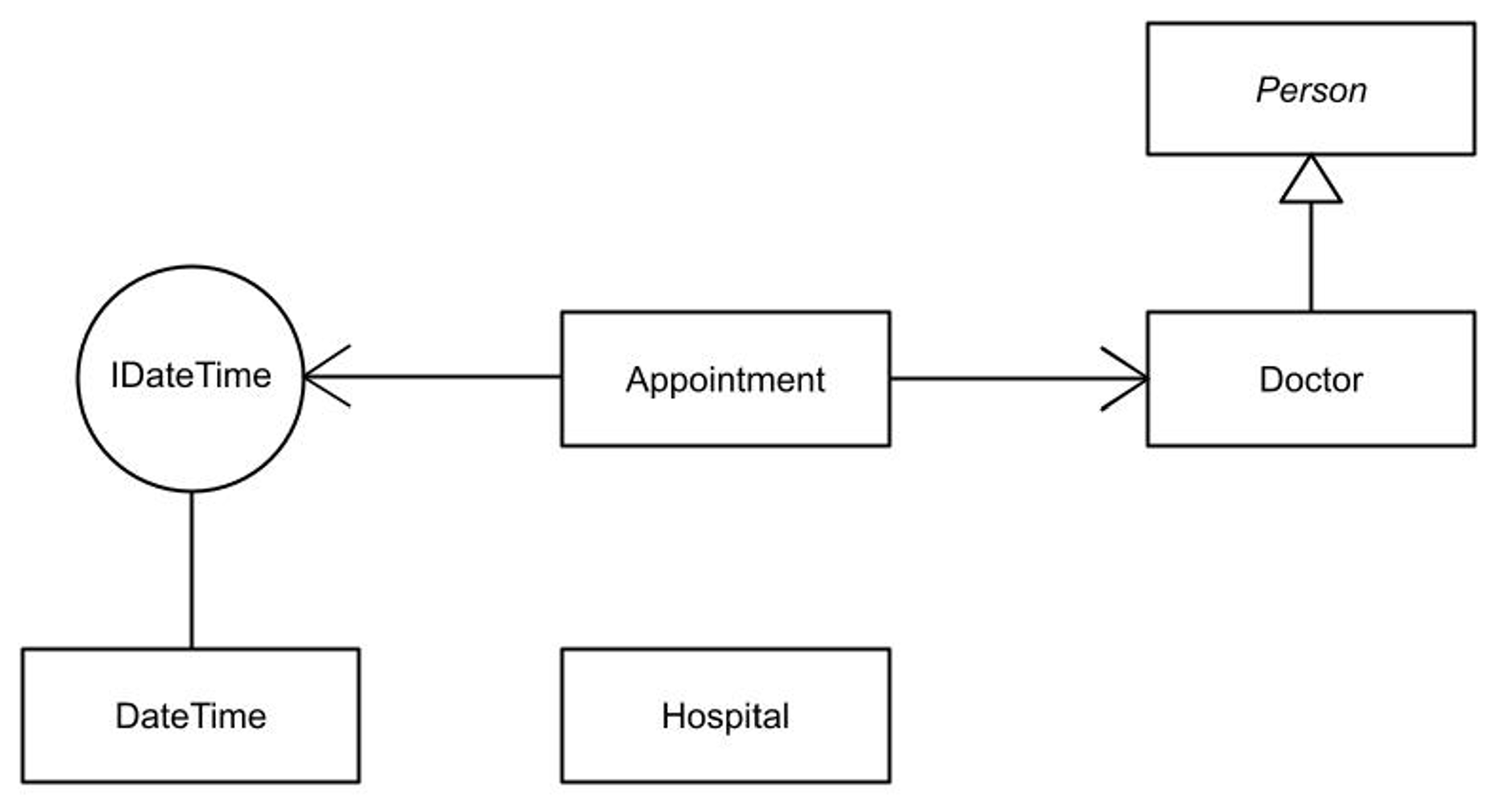
Such diagrams show which classes relate to each other, but some useful information is missing: *how many* objects are part of each association? For example, what if our implementation requires two times per appointment, one for the start time and one for the end time? Can an appointment have more than one doctor?
Association diagrams can include annotations on the reference arrows to show this information. The example below indicates that each **Appointment** has exactly two **IDateTime** objects, and has at least one **Doctor**. The periods indicate a range, and the asterisk indicates an unlimited amount.

***
_Please let us know if you find any mistakes, inconsistencies, or confusing language in this or any other CSCI0200 document by filling out the_ [_anonymous feedback form_](https://docs.google.com/forms/d/e/1FAIpQLScDfGq8uaR2zXSc9wZTA83kfmM8N9UATB0RU0cGMfvJnmL5lQ/viewform)_._