1044 views
owned this note
<style>
h3 {
border-bottom: 1px solid #ccc;
}
section {
margin-bottom: 2rem;
padding: 0em 1em;
padding-bottom: 1em;
border-radius: 4px;
background-color: #f7f7f7;
border: 1px solid #ccc;
}
summary {
font-weight: bolder;
}
summary:hover {
text-decoration: underline;
}
.todo {
color: #ff00ff;
border: 2px dashed #ff00ff;
padding: 0em 1em;
border-radius: 5px;
//display: none; // UNCOMMENT TO HIDE TODOs
}
</style>
# Lab 3: Testing and Debugging (Spring 2025)
## **Setup**
Using **[this GitHub Classroom link](https://classroom.github.com/a/G-OS5Nfw)**, accept the assignment and create a repository for your code. **Be sure to follow the [Java Stencil setup guide](https://docs.cs200.io/s/java-stencil-setup-guide)** for instructions on how to do this.
Refer to the [GitHub guide](https://docs.cs200.io/s/github-guide) if you are unfamiliar with it. Make sure you push your code regularly to back it up!
## **Learning Objectives**
- Use concrete examples and debugging to explore or explain how a program works
- Develop a collection of examples and tests that exercise key behavioral requirements/aspects of a problem
- Practice using debugging diagrams in tandem with the IntelliJ debugger to find and fix bugs in code
## **Testing**
For testing, you check if your methods are returning the corrected predicted outputs. If your expected outcome matches your actual outcome, your test will pass. If the two are different, your test will fail. Importantly, testing is often most effective for you to do _before_ you code. It gives you a chance to define your problem and write code that solves the problem you’ve set out to do.
Testing is often broken into two parts: (1) general cases and (2) edge cases.
### **General Cases**
Think of the general case as a problem motivator - it should communicate that your program generally works. An example could be testing if we can add 1 to each integer in a list: if we input `[1, 2, 3, 4, 5]`, the expected output would be`[2, 3, 4, 5, 6]`.
### **Edge Cases**
Edge cases test situations or input values that are not typical and require special handling. From the previous example, an edge case might be an empty list input. In this case, let’s say that inputting an empty list should return an empty list. You should include a test like this in your test suite, as it is a feature of your program and you should define behavior for the possible cases you could be given.
## **Testing** `void` **methods**
Sometimes, in Java, methods will return `void`, which means that they return nothing. The `main` method that runs your programs is one such example of a `void` method. Although you should never write tests for `main`, any other `void` method you write should be tested.
The strategy you should take is to write tests to check out the _side effects_, or changes that the `void` method is making. In this class, your `void` methods will almost always be modifying the fields of classes. It is your responsibility to check that these modifications are registered in your object. To do this, you should call the `void` method, and then in your test case, make sure that the proper field has been modified in the appropriate way.
:::info
For example, our `addFirst` method on the `IList`s from lecture is a `void` method. If you were to be the one implementing this method and wanted to check that it had worked, you should make sure that the first element of the list is the element that you added. Note that this means that the call to the method is not what would appear in the JUnit test. Your test case would look something like this:
```java
IList lst = new Empty();
lst.addFirst(3);
Assert.assertEquals(3, lst.firstVal());
```
There are more advanced ways that `void` methods can work - if you go on to take CSCI0330, in particular, you will learn about some interesting things `void` methods can achieve.
:::
## **Testing Scope**
Another important aspect of testing is to document exactly how far your program changes pieces of data. Say you are building your own `LinkedList` class and you want it to have a field for length. Let’s suppose that the `addFirst` method that you’ve written does indeed add the element to your list. Is it a given that the size has been updated too? No! These changes should also be documented in your code. If a method affects a variable that exists outside of the scope of the method (i.e. a field, not declared within the method), you should check to make sure that it is altered as you expect it to be. Thus, the test block is not sufficient to test that something was added correctly. We should have something that looks more like this:
```java
IList lst = new Empty();
lst.addFirst(3);
Assert.assertEquals(3, lst.firstVal());
Assert.assertEquals(1, lst.length());
```
## **Testing in Java**
**You’ve been learning how to test methods in Java in HW1, regardless of which track you came from.**
Here are some reminders on how testing works:
- We will provide you with starter test files for labs and homeworks, which will look something like `[ClassOrAssignmentName]Test.java`**.**
- To test the outcome of a method, we typically use `Assert.assertEquals` (sometimes `Assert.assertTrue` or `Assert.assertFalse`) inside of a test method in our testing class.
- To test for exceptions, we put the code that we expect to raise an exception inside a test method and put the annotation `@Test(expected = <exception-type>.class)` above the test method.
- To create a method that sets up some data before running any of your tests, put a `@Before` annotation before some method in your test class.
- When opening this project in IntelliJ for the first time, your project should have all the required testing libraries installed. If not, you will need to add both the `hamcrest-core-1.3.jar` and `junit-4.13.2.jar` files as dependencies to your IntelliJ project in order to use JUnit--see the IntelliJ guide for instructions if this happens.
## **Testing Task**
For this task, you will be writing tests for a sample program. **For now, just write the tests - do not run them and try to fix the sample program’s code.**
:::danger
:warning: **_Important:_** In this section, **do not modify the program – in fact, we don’t even want you to read it.** You should write your tests based on the following specification, in order to find out if the program we gave you has bugs.
:::
## **Program Specification**
In the starter code, we have given you a **_stack,_** which is a _last-in, first-out_ data structure. Think of this like a stack of plates on a counter – you can put clean plates on top of the stack, and you can remove plates starting with the most recent one you put on.
You can instantiate a new empty stack by using our `LabStack` class:
```java
LabStack myStack = new LabStack();
```
The methods for the stack are:
- `void push(int i)`: adds `i` to the top of the stack.
- `int pop()`: removes the top item from the stack and returns it. Throws an `IllegalStateException` if called on an empty stack.
- `int peek()`: “peeks” at the top item from the stack by returning it but not removing it. Throws an `IllegalStateException` if called on an empty stack.
- `int size()`: returns the number of items in the stack.
- `void clear()`: resets the stack to empty.
## **Write The Tests**
### **Task 1**
On paper (or in a notes program), **work with your partner to write down some things that should be true for this program.**
One example is “popping from a non-empty stack should decrease its size by 1.” What other truths (_properties_) can you come up with? **Come up with at least one for every method listed above, and more if appropriate. Remember to think about edge cases!**
### **Task 2**
Now that you know what you should test, we want you to **create a test suite for your program. Write these out in `LabStackTest.java`.** Be ready to tell a TA about what you chose to test and what edge cases you cover.
:::info
When running your test suite, **you will notice that not every test will pass--this is expected!** Part of the point of testing is to catch bugs in code, and your tests are (hopefully) catching some bugs in the code we gave you!
:::
:::success
**Checkpoint 1:** Call over a TA once you have written out your complete test suites.
:::
## **Testing and Domain Knowledge**
We call the specific knowledge of the rules, logic, and expectations of this context **domain knowledge**. Imagine you wrote a program to handle Brown student registrations for Spring Weekend. The registration form looks like this:

Your plan is to take input from this form and use it to create Student objects, which look like this:
```java
class Student {
String firstName;
String lastName;
String phoneNumber;
}
```
Because the form takes in a full name as a String, you decide that you need two functions, `extractFirstName` and `extractLastName`, to convert the full name to first and last name fields.
:::info
<details>
<summary>
<b> Here are the Documented Functions </b>
</summary>
```java
/*
Looks for the first instance of a space in the fullName string
and returns the contents of the String before the space!
If there is no space, it returns the input.
Ex: “John Smith” -> “John”
Ex: “My Name” -> “My”
Ex: “NoSpace” -> “NoSpace”
Ex: “” -> “”
*/
public String extractFirstName(String fullName) {...}
/*
Looks for the first instance of a space in the fullName string
and returns the contents of the String after the space!
If there is no space, it returns the input.
Ex: “John Smith” -> “Smith”
Ex: “This Is My Name” -> “Is My Name”
Ex: “NoSpace” -> “NoSpace”
Ex: “” -> “”
*/
public String extractLastName(String fullName) {. . .}
```
</details>
:::
<br>
A **user persona** is a fictional archetypical user whose goals and characteristics represent the needs of a larger group of users. Creating personas is a common industry practice that allows designers and engineers to ask “who are we building for?” and ensure the software they create meets the user’s needs.
For each of the following user personas, go through the registration process using the code above.
  
### Task 3
For each of the user personas above:
1. What would the program store for their first name and last name? Does this seem correct?
2. What assumptions were made by the programmer that led to these results?
### Task 4
Now that you have interacted with this system, each partner should **come up with a proposed change to fix the system.** You don’t need to write any code, just think about how you might solve some of the problems you encountered.
Here, the system has three main components: the form, the student object fields, and the name extraction methods. If you opt to alter the form as part of your proposed change, make sure you still collect full names and phone numbers in some capacity!
### Task 5
**Now think of a persona that would break your partner’s solution!**
:::info
**Hint**: If you can’t think of one, take another look at the user personas above and think internationally. Are we making any assumptions about ordering? Check out [_Falsehoods Programmers Believe About Names_](https://shinesolutions.com/2018/01/08/falsehoods-programmers-believe-about-names-with-examples/) for some common assumptions.
:::
**Reflect on how thinking through user personas is similar to or different to the type of testing you did in Part 1 of this lab.** It may help to think about the ways you think about coming up with JUnit assertions vs. how you came up with a persona to break your partner’s solution. In your opinion, how do you define the purpose of testing, keeping in mind both types of testing you’ve encountered in this lab?
:::success
**Checkpoint 2!:** Call over a TA to talk through your answers.
:::
<br>
## **Debugging**
**Debugging** is the process through which we discover where our program does not work like we think it should.
Good news: if you’ve written enough tests, you should be able to narrow down the scope of your search for bugs! In fact, the hardest part of debugging is finding out where the bug may be, which is why narrowing down the places that you need to look by defining your problem is so important. Once you have an idea of where things are going wrong, you can start to use some very useful tools.
:::info
A _debugger_ is a program that allows you to follow the execution of your own program and examine the values (environment/heap) you are working with. IntelliJ has a fantastic debugger that lays out everything you might need to know rather well. You can run the debugger by clicking the little bug icon in the top right corner next to the green play button. This will run the program as if you hit the run button, but within the scope of the debugger.

:::
## **Breakpoints**
Before starting debugging, you need to set one or more **breakpoints** (places in the program where you want the debugger to stop so that you can examine the code).

To insert a **breakpoint**, move your mouse to the left of the line you want to break on (**_1_** in the diagram above). If you have line numbers enabled, it should be to the right of the line numbers. Then, single-click, and a red dot should appear. To remove it, single-click on the breakpoint.
After setting a breakpoint and running the debugger, IntelliJ provides you with a debugging window, giving you access to all of its features.
:::info
### :eyes: **Most Important Debugging Features** :eyes:
The debugger view has a lot of buttons and controls--this can seem like a lot at first, **but in practice we only need a few of them, so don't worry!** Here are the most important parts of the debugging view, numbered to match the icons in the screenshot a above.
Take a moment to find each of these in the screenshot and try to remember what they do--you'll get practice with them in the next section.
#### Getting started
1. **Set a breakpoint**: Click in the area where you see the red circle to set a *breakpoint*. When debugging, your program pauses each time it encounters a breakpoint. Note that your program pauses _before_ executing the line it highlights.
2. **Debugging window**: This is where you will see everything you’ll need to debug your code such as all the useful debugging buttons and variables related to your program.
#### Key Controls
3. **Resume** (also called "**Go**"): continues running your program until it reaches another breakpoint or terminates. This is helpful to see what's happening in loops or recursive functions: set a breakpoint inside the loop, then press resume to skip to the next iteration
4. **Step Over**: runs the highlighted line of code and pauses before the next one. This allows you to watch what happens in your code line by line! As you do this, you can watch what happens to your program's variables (see #8, "Variables pane"). (**This is probably the button you will use most frequently**)
5. **Step Into**: Same as Step Over, but also goes inside method calls. If you are paused on a line that calls a method, use Step Into if you want to jump to that method and "step through" it line by line!
6. **Force Step Into**: We won't be using this one.
7. **Step Out**: Executes code until the current method returns, then takes you back to the method that called the method you were in. This is useful if you step into a method, but then you realize it's long and don't want to step through each line. :smile:
8. **Variables panel**: This pane shows all the variables in the method you are debugging--**this is where you see your program's memory!** Click on each variable to expand it--you can see fields of objects, elements in lists, and so on. As you step through your code, watch your variables to help make sure they behave how you expect--this will help you see what your code is doing and help you locate issues!
9. **Stop**: Stops the debugger--**click this when you're done debugging**. You can restart the debug session by pressing the Debug button again.
:::
## **Actions to Take During Debugging**
Here are some general steps to take while debugging:
1. Try to narrow down where you think the problem is--try to write tests and see which cases are failing that shouldn’t be. **Doing this will make the whole debugging process significantly easier.**
2. When you find a part that isn't working, set a breakpoint on the method or line that is causing the error.
3. Step into/over each line, keeping track of what your code is actually doing in memory. Think about what you expect the code to be doing vs what it is actually doing. It is helpful to have some pencil and paper handy to write down values of key variables at each step.
4. Have patience! It is normal to be unable to locate a bug immediately--as you step through things, try to compare what you see to **what you expect the program to be doing**. It may help to work out "what you expect" on paper as you do this. This process can take time--this is part of why we always suggest starting early.
5. Make the changes you need to and run your program to ensure that you’ve found the bugs!
## **Using Testing to Debug**
The underlying data structure of `LabStack` is a linked list implementation, where the front `Node` of the list is the top element of the stack. The end of the stack is denoted using a `null`. `LabStack` also has a `size` field that changes as elements are added/removed from the stack.

### Task 6
For the test cases you wrote, **draw out exactly how the methods of `LabStack` should output or alter the underlying data** (underlying linked list and `size` field). You should not change/add elements to the `LabStack` you have already drawn out, but instead **redraw** the entire `LabStack` with the change that you expect to see. We call these “Before and After” diagrams. Make sure you have at least one before/after diagram for each test method (it’s fine to reuse the before diagrams if you used a setup method to set some data up).
:::info
**_Example:_** if you have a test setup method (one preceded by a `@Before` annotation) that sets up an example stack, and then a test method that calls push once, your “before” diagram will show what the stack that you initialized in the setup method looks like, and your “after” diagram will show what the stack should look like after you push the element onto it.
:::
## **Using Failing Tests as Breakpoints**
Failing tests are a great starting point for creating breakpoints, so that you can step into your code and compare the output of your code to the diagram you drew. For example, say that the following test was failing:
```java
@Test
public void testOne() {
Dillo deadDillo = new Dillo(15, true);
Assert.assertEquals(deadDillo.length, 15);
}
```
Before debugging this failure, you would have drawn an example of what you expect the result of the method under test (in this case, the constructor) would be. It would probably look like:

To debug, you would place a breakpoint at the place in your test where you were calling that method. For this example, the breakpoint would be at line 3. Then you would step into the code and examine whether the environment/heap match what you expect. If a step causes a discrepancy between what you expect and what you see, then you can easily identify the bug!
::: info
**Example:** if you entered the Dillo constructor and saw that it set this.length to 14 in the debugger instead of the desired 15, you would know that is where the bug comes from:

:::
### Task 7
Using the test suite you created and IntelliJ’s built-in debugger, use the failing tests to go through the code that we have given you in `LabStack` and **find what is causing the bugs. Make the fixes you need until your whole test suite passes.** **Even if you see the problem in the code before you start the debugger, we want you to actually use the debugger to examine the program state.** Your TA will ask you to walk them through examples of how you used your diagram and the debugger to find the bugs in the code.
:::success
**Checkpoint 3!:** Call over a TA walk through your diagrams and debugging!
:::
****
## **Debug a Restaurant Management System!**
Now, it’s time for you to debug our project! First, we’ll give you an outline of how it works. You can find the corresponding code in the `debugging` folder above `lib`
At a high level, the project simulates a restaurant with a fixed number of tables, where parties of diners arrive and depart. We assume any party can eat at any table, and the maximum number of parties that can simultaneously be seated is, therefore, equal to the number of tables in the restaurant. Further, only parties on the list of upcoming reservations can be seated.
When a party (who is on the list of `upcomingReservations`) `arrives`, they are either seated (if there are open tables) or put on a queue of parties who are waiting to be seated. Since they’ve arrived, they are no longer an `upcomingReservation`. When a party `departs`, the next party waiting in the queue is seated immediately.
The following classes and descriptions are the parts of our project you should know:
1. `Party` - a class representing a group of people that can be seated at a restaurant. A party has only a name and no other characteristics.
2. `Restaurant` - a class representing the state of the restaurant. It has:
- `upcomingReservations` contains parties that we expect to show up at some point. When they are either waiting or seated, they are no longer an `upcomingReservation` and should not be in this list.
- `seatedParties` contains parties that are currently seated. The size of this should never exceed `numTables`.
- `waitingParties` are parties that have arrived, but are not yet seated. A party in `waitingParties` should not be in `upcomingReservations` or `seatedParties`.
- a constructor which takes the name of the restaurant, number of tables in the restaurant, and list of upcoming reservations for that night.
- `arrive` - a method that takes a party which has just arrived. The method checks the reservation list (and returns if the party isn’t on it), then seats the party if there is available room; otherwise, it adds the party to the queue of parties waiting to be seated.
- `depart` - a method that takes the party which is departing. It removes the party from the list of seated parties, then checks the queue of waiting parties. If there’s a waiting party, it seats that party.
- `hasSeatedParties` and `hasUpcomingReservations` methods that return `true` if the corresponding collection of parties is non-empty.
- `randomSeatedParty` and `randomReservationParty` methods that return a random party from the corresponding collection of parties.
- a `main` method that creates several parties and starts up a `Restaurant`. **Run/debug this method to start the program.**
3. `Manager` - a class that randomly decides when parties arrive at or depart from the restaurant. It has:
- `makeDecision` - a method that chooses at random whether to let a new party arrive or make a seated party depart.
- `partyArrives` - a method that tells the restaurant to let a new party arrive.
- `partyDeparts` - a method that tells the restaurant to let a seated party depart.
There are a few new things included in this restaurant simulation. You’ll notice two Java interfaces: `Collection` and `Queue`. The `Collection` interface represents any group of elements, whereas the `Queue` interface is used for any data structure where elements are added (enqueued) and removed (dequeued) such as a `LinkedList`. Feel free to check out the Java documentation for [`Collection`](https://docs.oracle.com/en/java/javase/17/docs/api/java.base/java/util/Collection.html) and [`Queue`](https://docs.oracle.com/en/java/javase/17/docs/api/java.base/java/util/Queue.html) for more information.
Further, you’ll notice that a Restaurant has an instance of a `Manager` as a field, and `Manager` also has an instance of a `Restaurant` as a field. Circular references like this are common in OOP, and allow the two objects to interact by calling methods on each other.
If the restaurant simulation were working properly, you would see _interleaved arrival and departure messages_, sometimes multiple arrivals/departures in a row, etc. Critically, you should:
- Never see print statements indicating there are more seated parties than there are tables at any point in the output.
- Never see one particular party arrive or depart more than once.
- See that once a party departs, the party waiting the longest should be seated immediately.
- See that all parties eventually leave, and that the restaurant closes for the night once they do.
### Task 8
**Draw debugging diagrams and use the IntelliJ debugger to find the two bugs, and fix them!** Be sure to be able to explain to a TA what you did and why the code wasn’t working before, using your debugging diagrams. Use the hints below to help your search, as it’s hard to look at all this code you didn’t write and figure out what’s even happening.
:::info
**First step: run the code:** to get started, run the `main` method in the `Restaurant` class before trying to debug it to see what’s wrong with it and form an educated guess about where the bugs are originating. What is happening that shouldn’t be?
**To run the program and see its output**, you can do the following:
1. Go to the `main` method in the `Restaurant` class, click the green triangle and select **Run** (later, you'll click **Debug**).
**Note**: If you have trouble running the main method, see the **[these troubleshooting steps](https://docs.cs200.io/s/java-stencil-setup-guide#Troubleshooting)**.
2. After starting the program, you should see some output in IntelliJ's console at the bottom (as shown in the figure below). You may need to click on the top line in the sidebar (see the figure) to view the console--you should see a bunch of stuff print continuously (Which is pretty sus... maybe that's a bug!)
3. To stop program, you can click the **Stop** button in the console view, as shown in the figure. After stopping the program, you might You might need to click in the sidebar to see the output again (per step (2))
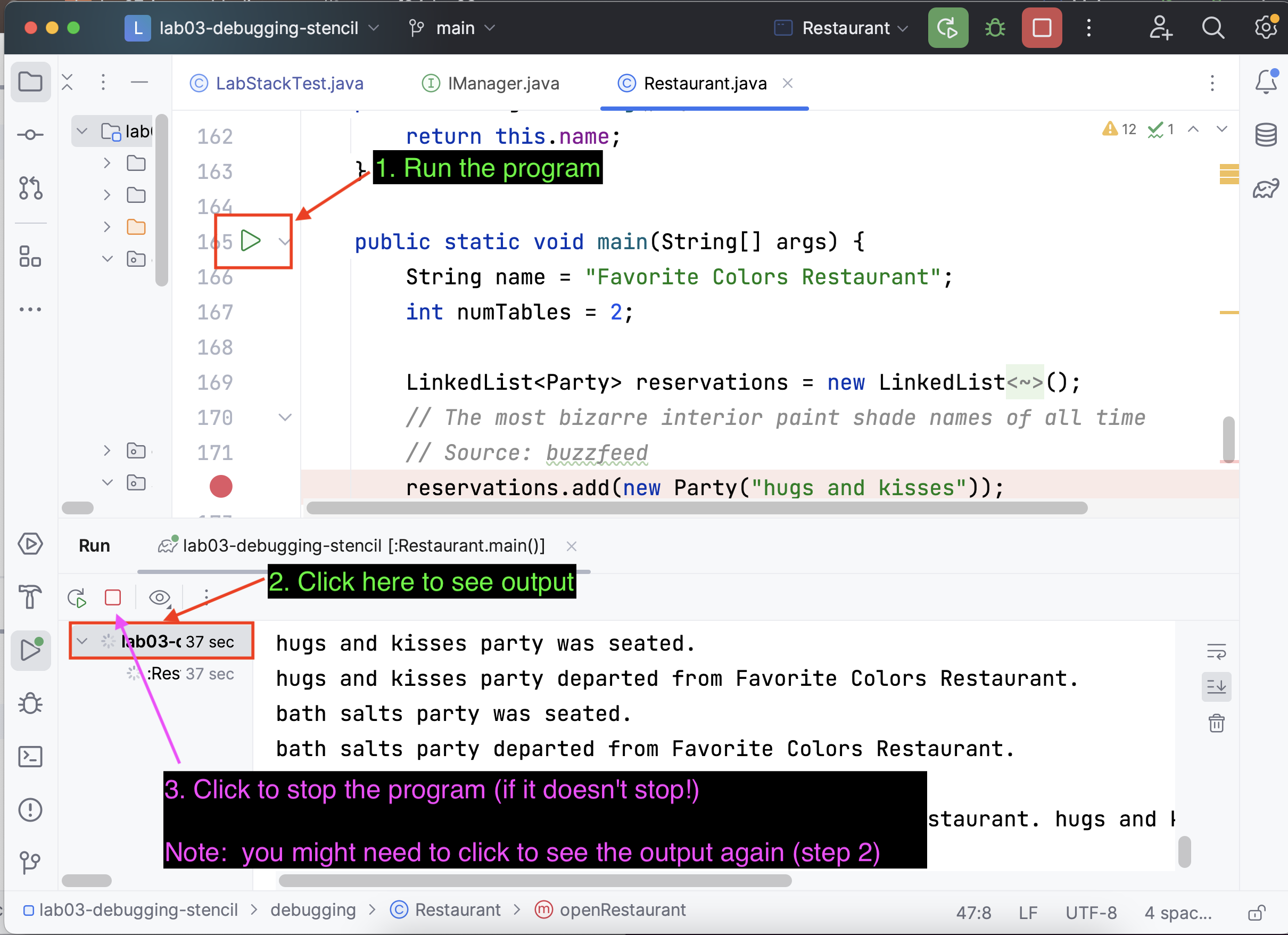
You're now able to run the program and see it fail, yay! Now you can start debugging! See the hints below for steps to start thinking about this.
:::
:::success
<details>
<summary>
<b> Hint: Where are the Bugs </b>
</summary>
The bugs are _both found in methods we’ve outlined above_, not other unmentioned methods. Further, the bugs are not found in either `makeDecision` inside the `Manager` class or `randomSeatedParty`/`randomReservationParty` or `hasSeatedParties`/`hasUpcomingReservations` inside the `Restaurant` class.
</details>
:::
:::success
<details>
<summary>
<b> Hint: Look at the <code>Main</code> Method </b>
</summary>
Look at the `main` method of the `Restaurant`. Based on your educated guess, sketch out what the restaurant should be doing before and after some methods are called. You’ll notice that there is some randomness in the code, so you may have to draw two (or more!) diagrams to encompass the possible scenarios.
:::
:::success
<details>
<summary>
<b> Hint: Unfamiliar with Methods? </b>
</summary>
We know you may not have seen all of these types before, and might be unfamiliar with their methods. Hover your mouse above any method name or any type declaration to get more information!
</details>
:::
:::success
**Final Checkpoint!:** Congratulations! You completed this week's lab. Call a TA over to get checked off.
:::
***
_Please let us know if you find any mistakes, inconsistencies, or confusing language in this or any other CSCI0200 document by filling out the_ [_anonymous feedback form_](https://docs.google.com/forms/d/e/1FAIpQLSdnKbeXD21tvwf5VSIvMO5qlFhRo-51UtlR7vOLDogbWZ01Vw/viewform?usp=sf_link)_._